
StatsHunters Chrome 插件, crx 扩展下载
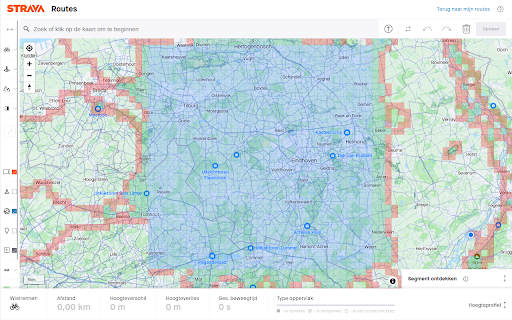
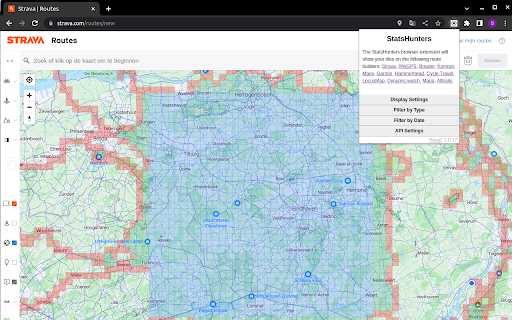
Show tiles on Strava route builder
To make it easier to create new routes to achieve new tiles you can use the StatsHunters Chrome extension to show tiles on different route builders.
1. Install the extension
2. Login to StatsHunters and copy the API-code from the settings page
3. Click the StatsHunters Chrome extension icon and past the API-code
4. Go to one of the route builders
5. Start building new routes
You can use the plugin on different websites, the following sites are supported: Strava, Komoot and others. Check the full list on https://www.statshunters.com/faq
| 分类 | 🎬娱乐 |
| 插件标识 | ldhkneiheabejbefhgjddpamijajabmm |
| 平台 | Chrome |
| 评分 |
★★★★☆
4.8
|
| 评分人数 | 51 |
| 插件主页 | https://chromewebstore.google.com/detail/statshunters/ldhkneiheabejbefhgjddpamijajabmm |
| 版本号 | 2.0.6 |
| 大小 | 32.07KiB |
| 官网下载次数 | 10000 |
| 下载地址 | |
| 更新时间 | 2024-09-30 00:00:00 |
CRX扩展文件安装方法
第1步: 打开Chrome浏览器的扩展程序
第2步:
在地址栏输入: chrome://extensions/
第3步: 开启右上角的【开发者模式】
第4步: 重启Chrome浏览器 (重要操作)
第5步: 重新打开扩展程序管理界面
第6步: 将下载的crx文件直接拖入页面完成安装
注意:请确保使用最新版本的Chrome浏览器
同类插件推荐

Refined Mapy.cz
Refines Mapy.cz interface and adds useful features

Strava Enhanced Maps
Extension Strava qui permet d'ajouter de nouve

Komoot extension
This extension allow us to export the Komoot track

Squadrats Route Planning
Add thrill to your cycling route planning by hunti
StatsHunters
Show tiles on Strava route builderTo make it easie
strava-map-switcher
Map switcher for Strava websiteMap switcher for St

Strava Filter
Strava filter for filtering rides less then given

Strava, export gpx track
Export gpx-track from strava.com (c) Eugene Ivanov

Strava Enhancement Suite
Handy tools and improvements to Strava.com- Repeat

Elevate for Strava
Elevate your strava experience and goals! Track yo

VeloViewer Strava Plugin
Additions to Strava website to provide helpful lin

Sauce for Strava™
Additional functionality for your cycling and runn

VVGmap
Export unexplored tiles from VeloViewer as a map o