
PLAYit for pc, windows Extension Chrome 插件, crx 扩展下载
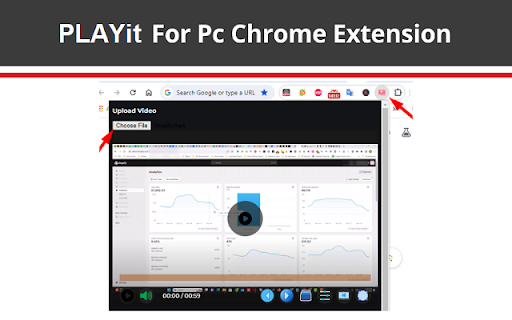
Change Your Browser into a Media Player with PLAYit for pc Extension. custom video player extension.
With the help of this tool, you can use it as a media player in your browser.
It enables you to use any media player for formats like mp4, wmv, etc. It also allowing for easy downloads on PC, including Windows 7, 8, 10, and Mac.
How to use it?
First, you need to add our extension to your browser.
Now click on the extension icon to open its interface.
Here you need to Activate the Extension.
Now you can upload any media file and enjoy watching.
✅ Disclaimer: Please note that " PLAYit for PC, Windows, and Mac" Chrome Extension is an independent product and is not associated, affiliated, or endorsed by the PLAYit Android app or its developers. We respect intellectual property rights and make no claim to any copyrights associated with the PLAYit Android app.
| 分类 | 🎬娱乐 |
| 插件标识 | ldigebmeilenpndhlnnhkhpliffigeai |
| 平台 | Chrome |
| 评分 |
★★★★☆
4.3
|
| 评分人数 | 9 |
| 插件主页 | https://chromewebstore.google.com/detail/playit-for-pc-windows-ext/ldigebmeilenpndhlnnhkhpliffigeai |
| 版本号 | 1.0 |
| 大小 | 181KiB |
| 官网下载次数 | 481 |
| 下载地址 | |
| 更新时间 | 2024-05-13 00:00:00 |
CRX扩展文件安装方法
第1步: 打开Chrome浏览器的扩展程序
第2步:
在地址栏输入: chrome://extensions/
第3步: 开启右上角的【开发者模式】
第4步: 重启Chrome浏览器 (重要操作)
第5步: 重新打开扩展程序管理界面
第6步: 将下载的crx文件直接拖入页面完成安装
注意:请确保使用最新版本的Chrome浏览器
同类插件推荐
PLAYit for pc, windows Extension
Change Your Browser into a Media Player with PLAYi

画中画 YouTube
使用此YouTube扩展程序在PC上创建一个浮动视频播放器,始终位于所有窗口之上。YouTube画中

视频转音频转换器 -Mp4 to Mp3 Converter
使用视频转音频转换器:在线将视频转换为音频(mp4转mp3等)。应用程序用于将文件转换为mp3并提取

Window Resizer
Resize the browser window to emulate various scree