
Dance Practice Assist for Youtube Chrome 插件, crx 扩展下载
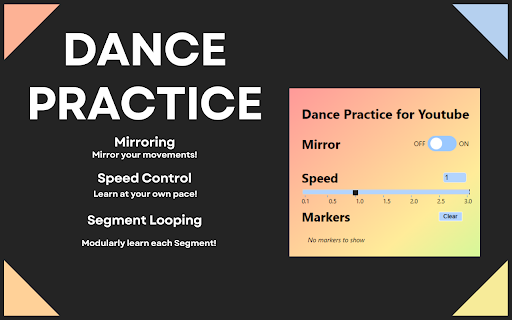
Video Mirroring, Speed Control, and Segment looping to help you learn dance choreographies!
Summary ?
This extension allows you to mirror videos, control playback speed (0.1 - 3.0), and mark up videos to loop. This is helpful in a variety of fields such as sewing, drawing, and especially dance! ??
To use it simply click the extension at the top right on any YouTube video!
Features ?
✅Mirror Mode
✅Speed Control
✅Segmentation
✅Video-Based Storage
Guide
Flip
Simply press the flip switch to mirror the video!
Speed
Manually input the speed into the text box OR click on the timeline bar!
Segment Loops
Clicking on the extension puts a marker icon into the youtube player.
Clicking this icon creates a marker at the current timestamp of the video.
You can select two markers to define the current practicing segment which will loop once you reach the end.
By Creating up to 6 markers, you can cut up a dance and modularly improve on any segment that needs work!
?This extension does not collect any personal or identifying information.
Usage FYI
1. If the buttons are not working, try reloading the webpage. ♻️
2. Saved properties are applied when clicking the extension popup at the top right. ?
| 分类 | 🎉趣味休闲 |
| 插件标识 | ldlapkanohjmjepklnhnohdhofbnnfih |
| 平台 | Chrome |
| 评分 |
★★★★☆
4.8
|
| 评分人数 | 14 |
| 插件主页 | https://chromewebstore.google.com/detail/dance-practice-assist-for/ldlapkanohjmjepklnhnohdhofbnnfih |
| 版本号 | 1.2 |
| 大小 | 1.07MiB |
| 官网下载次数 | 160 |
| 下载地址 | |
| 更新时间 | 2024-01-02 00:00:00 |
CRX扩展文件安装方法
第1步: 打开Chrome浏览器的扩展程序
第2步:
在地址栏输入: chrome://extensions/
第3步: 开启右上角的【开发者模式】
第4步: 重启Chrome浏览器 (重要操作)
第5步: 重新打开扩展程序管理界面
第6步: 将下载的crx文件直接拖入页面完成安装
注意:请确保使用最新版本的Chrome浏览器
同类插件推荐

YouTube Video Timestamp repeater
Seamlessly loop specific segments of YouTube video

Dance Dash
Dashboard for saving timestamps and customizing vi

YT Mirror
YT Mirror adds a new 'mirror' button to th

VideoMirror
Video mirror (left-to-right) on any page (includin
MirrorTube
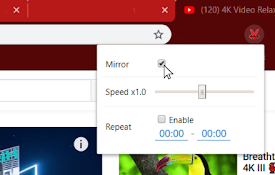
Provides useful features for dancersMirror YouTube
Dance Practice Assist for Youtube
Video Mirroring, Speed Control, and Segment loopin

Mirror YouTube for Dance Practice 거울모드 안무 연습
You can mirror, loop, and change tempo of a video
MirrorPlay : Youtube Mirror
An Extension to laterally invert youtube videosMir

Rewind
Loop segments, mirror videos, hide comments, and t

Mirror extension!
The mirror extension mirrors web pages!With the mi

YouLoop - Replay your favorite video parts
Chrome extension to loop specific parts of your Yo
BPM 更改器
轻松使用 BPM 更改器 调整歌曲节奏。作为节奏、音乐速度和音频速度更改器非常完美。立即定制您的声音
Youtube 循环播放
让 youtube 一键重复播放歌曲! 循环 YouTube 视频、聆听歌曲并享受数小时的无限重播?