
Music LAW - Lyrics AnyWhere Chrome 插件, crx 扩展下载
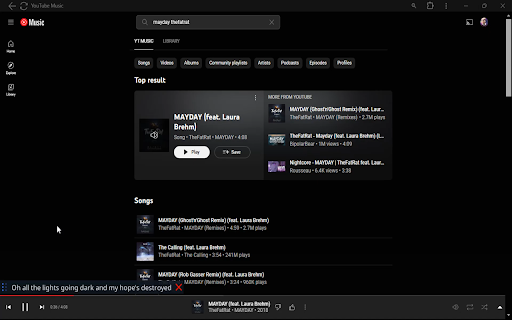

Shows lyrics in an overlay window of the song playing on YouTube Music.
Do you fancy singing-along to a song you're playing on YouTube Music, no matter what software you're using or while enjoying your favorite video game?
This extension works together with an application to show you the synced lyrics of the track playing on YouTube Music.
Works best with English songs.
★ Installation
• Download the latest executable from https://github.com/iamdevdiv/Music-LAW-Lyrics-AnyWhere/releases and run it to open the overlay window.
• Install this extension.
That's it! Play your favorite song on YouTube Music and synced lyrics will automatically pop up on the overlay window.
| 分类 | 🛠️工具 |
| 插件标识 | legffijegmnbcphbcjkgmooadpjiaikg |
| 平台 | Chrome |
| 评分 |
★★★★☆
4.3
|
| 评分人数 | 82 |
| 插件主页 | https://chromewebstore.google.com/detail/music-law-lyrics-anywhere/legffijegmnbcphbcjkgmooadpjiaikg |
| 版本号 | 1.1 |
| 大小 | 6.66KiB |
| 官网下载次数 | 41 |
| 下载地址 | |
| 更新时间 | 2024-06-05 00:00:00 |
CRX扩展文件安装方法
第1步: 打开Chrome浏览器的扩展程序
第2步:
在地址栏输入: chrome://extensions/
第3步: 开启右上角的【开发者模式】
第4步: 重启Chrome浏览器 (重要操作)
第5步: 重新打开扩展程序管理界面
第6步: 将下载的crx文件直接拖入页面完成安装
注意:请确保使用最新版本的Chrome浏览器
同类插件推荐
Music LAW - Lyrics AnyWhere
Shows lyrics in an overlay window of the song play
YouTube Musical Spectrum
Audio visualizer for YouTube and YT Music with mus

Lyrics for YouTube Music
Search and show lyrics for YouTube Music, from Mel

Listen On Repeat YouTube Looper
Looper for YouTube - Puts any YouTube Video on an