
Custom UserAgent String Chrome 插件, crx 扩展下载
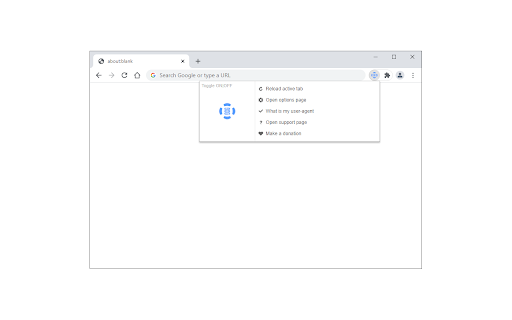

Add a custom useragent string for desired URLs or domains.
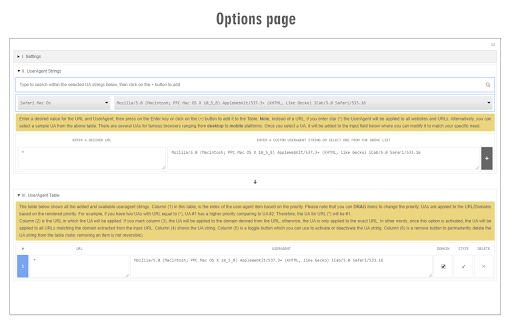
Custom UserAgent String is an extension that enables you to easily change your browser's user-agent by adding site-specific user-agent strings from the Options page.
Some features:
1. Add a custom user-agent string for each URL or website (domain).
2. There is an option to change each URL to a domain from the options page.
3. Toolbar popup has an ON or OFF switch button (left side).
4. User agents can be added to the options page (more than 100 sample user-agent strings are also provided).
5. For each user-agent string, you can either delete or disable it for future use.
6. To find a user-agent string you can either use a search engine (there are plenty of websites that provide a free UA list) or use the sample list provided on the addon's options page. This list includes more than 100 UAs for modern browsers and ranging from desktop to mobile platforms. This list is also available on the addon's homepage, FAQ section.
Note: to report bugs, please visit the addon's homepage (https://mybrowseraddon.com/custom-useragent-string.html) and fill out the bug report form.
| 分类 | 💻开发者工具 |
| 插件标识 | lejiafennghcpgmbpiodgofeklkpahoe |
| 平台 | Chrome |
| 评分 |
★★★★☆
4.4
|
| 评分人数 | 233 |
| 插件主页 | https://chromewebstore.google.com/detail/custom-useragent-string/lejiafennghcpgmbpiodgofeklkpahoe |
| 版本号 | 0.2.3 |
| 大小 | 379KiB |
| 官网下载次数 | 40000 |
| 下载地址 | |
| 更新时间 | 2024-02-20 00:00:00 |
CRX扩展文件安装方法
第1步: 打开Chrome浏览器的扩展程序
第2步:
在地址栏输入: chrome://extensions/
第3步: 开启右上角的【开发者模式】
第4步: 重启Chrome浏览器 (重要操作)
第5步: 重新打开扩展程序管理界面
第6步: 将下载的crx文件直接拖入页面完成安装
注意:请确保使用最新版本的Chrome浏览器
同类插件推荐

User Agent Switcher
Change your user agent quickly and easilyOpen sour
HW address converter
Convert MAC addresses between common formats.A too

Custom UserAgent String
Add a custom useragent string for desired URLs or

YouTube™ TV Desktop
Allows users to load YouTube™ TV App from regular

Youtube TV On PC
Enables Youtube TV with auto HD on your pc so you
用户代理切换器
Quickly and easily switch between popular user-age

Http User-Agent Switcher
Http User-Agent Switcher 扩展提供网页快捷菜单,以及工具栏按钮方式快捷切换

User-Agent Switcher
Switch between popular useragent strings from tool

User-Agent Switcher for Chrome
Spoofs & Mimics User-Agent strings.Ever needed

Advanced User Agent Switcher
Helps users to change browser user agent string ac

User Agent Switcher
Simplest way to switch between user-agents in your

Browser Fingerprint Protector
Prevents browser fingerprinting by spoofing your p

User-Agent Switcher and Manager
Spoof websites trying to gather information about