
Duo Mono Chrome 插件, crx 扩展下载
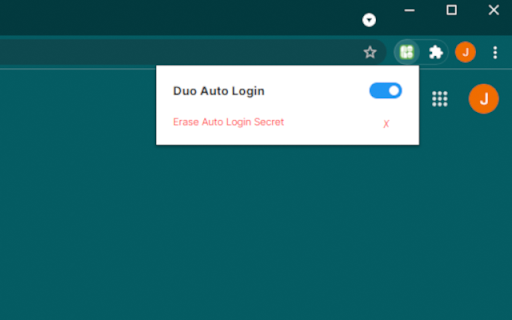
Automatically log into Duo 2fa. If you have chrome sync turned on it will work anywhere you are signed into chrome.
NOT ACCOCIATED WITH © 2022 Duo https://duo.com/
AFTER INSTALL — QUICK INSTRUCTIONS
• Go to you Duo protected service as you always do.
• You should see a message from Duo Mono instructing you to sign in as normal.
• If you're sign in is successful, you're all done! You should be automatically logged in from now on.
*If it doesn't work, try reloading the page or contact me for support.*
HOW IT WORKS
On your first sign in after installing the extension you will see a message telling you that you need to sign in with you usual authentication method. By signing in you are allowing Duo Mono to create a new authentication device. This device will say it is of type android device, however, it is actually just using this device to acquire a device token.
Duo Mono uses this token to query Duo's server to acquire an authentication secret. This secret is saved to you google sync storage and used to generate a login token each time it signs you in. It sets your default authentication device to the android device it created. During this process you will see multiple pages be automatically filled in and then you will be redirected to you usual destination.
When your session runs out and you need to authenticate using Duo again, Duo Mono will automatically generate a token and submit it for you.
SECURITY CONCERNS
• Your Duo integrated service is now as secure as your chrome account. If your chrome account is compromised, remove the device Duo Mono created for you immediately because it could be used to sign into your account even if the infiltrator no longer has access to your chrome account. The device will be called ext-auto-login
• This project is open source. You may verify the security of the source code yourself on GitHub. https://github.com/JacobZwang/duo-mono
INFO
• If you need log in manually or change something, open the extension popup in the top right and flip the switch off.
•This will not work with multiple Duo accounts at the same time (yet).
| 分类 | 📝工作流程与规划 |
| 插件标识 | lncmlpcdphjpofcggicgciiakehkgjpf |
| 平台 | Chrome |
| 评分 |
★★★★★
5
|
| 评分人数 | 2 |
| 插件主页 | https://chromewebstore.google.com/detail/duo-mono/lncmlpcdphjpofcggicgciiakehkgjpf |
| 版本号 | 0.1.1 |
| 大小 | 27.56KiB |
| 官网下载次数 | 45 |
| 下载地址 | |
| 更新时间 | 2022-02-01 00:00:00 |
CRX扩展文件安装方法
第1步: 打开Chrome浏览器的扩展程序
第2步:
在地址栏输入: chrome://extensions/
第3步: 开启右上角的【开发者模式】
第4步: 重启Chrome浏览器 (重要操作)
第5步: 重新打开扩展程序管理界面
第6步: 将下载的crx文件直接拖入页面完成安装
注意:请确保使用最新版本的Chrome浏览器
同类插件推荐

SPAMBEE
Report to SpamBee a fraudulent website, or a spam

Easy Duo Authentication, updated by Zavins
Gives you passcodes for the Duo Multi-Factor Authe

AutofillDuo
Skip the hassle of DuoYou've got meetings to j
Duo Mono
Automatically log into Duo 2fa. If you have chrome

Bye DUO
Log in to NYU using just your browser! Goodbye to

Duo Passcode Generator
Generates HOTP Passcodes for Duo Security Multi-Fa

PCO MusicStand MIDI control
Control PCO MusicStand (web version) using MIDI co
CloakingVideo - Watch YouTube Subtly!
Watch YouTube Videos Without Being Noticed By Near

Duolingo Unicode Normalizer
Automatically normalizes Duolingo answers.Duolingo
toMono
Gets video element, makes audio context mono.Updat

Auto 2FA
Login through Duo Mobile in your browser.Clicking

Okta Verify Auto Send
Automatically send an Okta Verify push notificatio

focusLab:效率工具
将您的生产力提升到新的高度。专注实验室 (focusLab):将您的生产力提升到新的高度 优化您的