
GitHub Merge Guardian Chrome 插件, crx 扩展下载
Prevent incorrect merges on GitHub's pull request.
This extension, "GitHub Merge Guardian," is a tool designed to prevent incorrect merges on GitHub's pull request page.
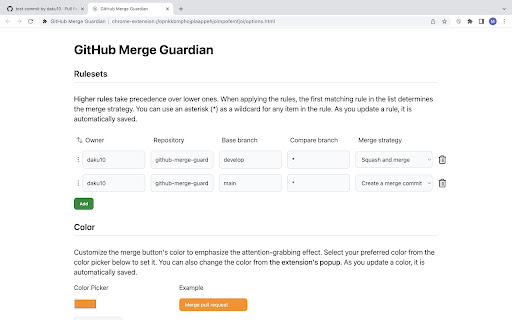
With this extension, you can easily control the merge method for pull requests. Add configurations to apply the appropriate merge method based on the combination of repositories and branches.
Features:
- Users can add multiple configurations consisting of repository name, base branch, compare branch, and merge strategy.
- An asterisk (*) can be used as a wildcard in each item.
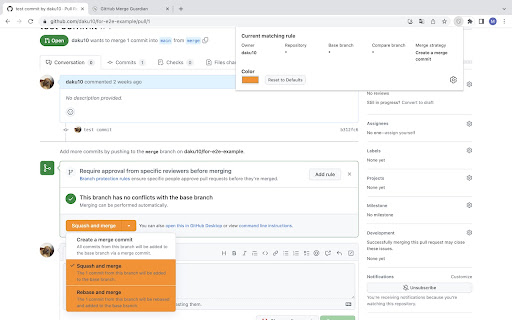
- When the configuration matches, the color of the merge button is changed to prevent incorrect merges.
- The extension only changes the button color, allowing merges with strategies other than the specified one.
- The color is customizable.
Example:
- For merges into the develop branch, use squash merge by default. However, for merges from release/* branches, use create merge commit.
Disclaimer:
This extension is not affiliated with, sponsored by, or endorsed by GitHub, Inc.
Contact:
For any issues - open an issue on https://github.com/daku10/github-merge-guardian/issues
| 分类 | 💻开发者工具 |
| 插件标识 | lnnbjejjanhgjakiobppbbchlgbbglio |
| 平台 | Chrome |
| 评分 |
★★★★★
5
|
| 评分人数 | 6 |
| 插件主页 | https://chromewebstore.google.com/detail/github-merge-guardian/lnnbjejjanhgjakiobppbbchlgbbglio |
| 版本号 | 1.2.0 |
| 大小 | 306KiB |
| 官网下载次数 | 139 |
| 下载地址 | |
| 更新时间 | 2023-05-12 00:00:00 |
CRX扩展文件安装方法
第1步: 打开Chrome浏览器的扩展程序
第2步:
在地址栏输入: chrome://extensions/
第3步: 开启右上角的【开发者模式】
第4步: 重启Chrome浏览器 (重要操作)
第5步: 重新打开扩展程序管理界面
第6步: 将下载的crx文件直接拖入页面完成安装
注意:请确保使用最新版本的Chrome浏览器
同类插件推荐

GitHub Pull Requests
See all of your repo's pull requests in one pl
GitHub Merge Guardian
Prevent incorrect merges on GitHub's pull requ

Notifier for GitHub
Displays your GitHub notifications unread countIt

GitHub Code Folding
Enable code folding when viewing files in GitHub.C