
StreamCapture Toolkit: Download and clip audio streams - In Browser Chrome 插件, crx 扩展下载
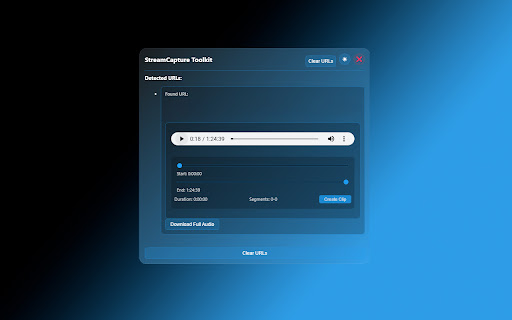

StreamCapture Toolkit lets you download audio streams and create custom clips directly in your browser. HLS & m3u8 supported.
Perfect for archiving social audio spaces, saving important discussions, and creating clips of your favorite moments - all with just a few clicks. HLS & m3u8 audio stream supported, video coming soon.
Key Features:
- Capture high-quality audio streams in real-time
- Create custom clips from longer recordings
- Save audio content for offline listening
- Simple, user-friendly interface
- Local storage for your privacy
Ideal Uses:
- Save important segments from live broadcasts
- Create highlight clips from longer sessions
- Archive audio content for personal reference
- Build a library of memorable moments
Watch Video to see it in Action!
This extension processes everything locally on your device, ensuring your privacy and data security. Perfect for educational purposes, content analysis, and personal archiving.
Note: Please respect content creators and copyright holders. This tool is intended for personal, non-commercial use only.
-----------------------------------------------------------------------------------------------------------------------------------
Changelog
[Version 4.20.2] - 1-11-2025
Changed (Visual Updates Only, Core Function is same)
- Renamed extension to "StreamCapture Toolkit" to better reflect the extension's focused utility
- New app icon design with microphone and download arrow
- Updated storefront image with a more professional look showcasing the new icon and color scheme
[Version 4.20.1] - 12-26-2024
Added
- Duration validation system for accurate audio stream detection
- Extension context validation and error protection
- Improved stream monitoring and capture system
- UI enhancement: loading states and timeouts
- Manifest data preloading for faster initialization
- Unique ID system for play button tracking
- Exact duration extraction from time elements
- Unloading state tracking
- Comprehensive logging system
Changed
- URL detection now uses strict validation for better accuracy
- Comprehensive header handling system implemented
- Fixed popup dimensions
- Button styling and interactions refined
- Resource types in declarativeNetRequest rules updated
- Enhanced click event detection and handling
- Improved state management system
- XHR interception made more selective (Video streams are not included,for now)
Fixed
- Navigation event errors
- Popup window layout shifts
- Clip control loading states
- Memory leaks in stream monitoring
- HLS initialization failures
- Cross-origin request handling
- Cleanup procedures
- Invalid state handling
Removed
- Unrestricted resource types from rules.json
- Redundant URL validation checks
- Unreliable stream detection methods
- Automatic popup resizing
| 分类 | 🛠️工具 |
| 插件标识 | locmfhplhhkinioocffckbljplpcgomo |
| 平台 | Chrome |
| 评分 |
★★★★☆
4.1
|
| 评分人数 | 1565 |
| 插件主页 | https://chromewebstore.google.com/detail/streamcapture-toolkit-dow/locmfhplhhkinioocffckbljplpcgomo |
| 版本号 | 4.20.2 |
| 大小 | 179KiB |
| 官网下载次数 | 72 |
| 下载地址 | |
| 更新时间 | 2025-01-13 00:00:00 |
CRX扩展文件安装方法
第1步: 打开Chrome浏览器的扩展程序
第2步:
在地址栏输入: chrome://extensions/
第3步: 开启右上角的【开发者模式】
第4步: 重启Chrome浏览器 (重要操作)
第5步: 重新打开扩展程序管理界面
第6步: 将下载的crx文件直接拖入页面完成安装
注意:请确保使用最新版本的Chrome浏览器
同类插件推荐

视频转音频转换器 -Mp4 to Mp3 Converter
使用视频转音频转换器:在线将视频转换为音频(mp4转mp3等)。应用程序用于将文件转换为mp3并提取
StreamCapture Toolkit: Download and clip audio streams - In Browser
StreamCapture Toolkit lets you download audio stre

FetchV - M3U8/HLS视频下载器
用于嗅探、保存网页视频和直播的视频下载器。这是一个通用的网页视频下载工具,适用于下载网页中的HLS

HLS Player - m3u8 Streaming Player
HLS Player - m3u8 HTTP Live Streaming (HLS) Player