
Emoji reactions for GitHub Chrome 插件, crx 扩展下载
Add emoji reactions to GitHub code diffs
? Emoji reactions for GitHub
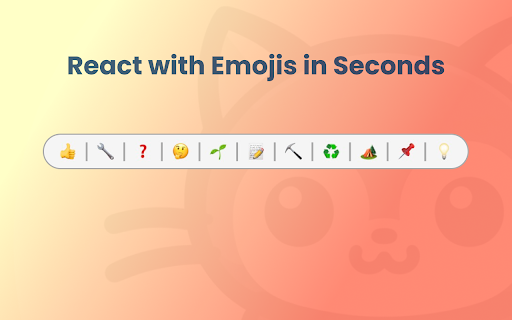
Enhance your GitHub code reviews with intuitive emoji reactions. This Chrome extension allows developers to easily add emojis directly to code diffs for a more expressive and streamlined feedback process.
? Key Features:
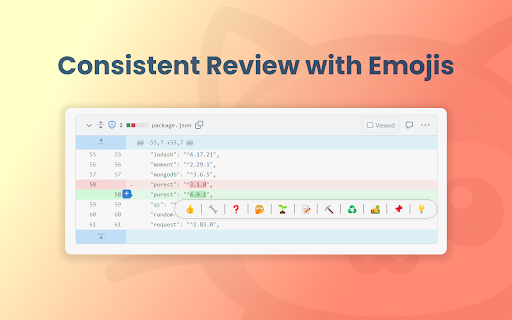
- ? Emoji Integration in Code Reviews: Add visual context to your feedback by attaching emojis directly to code lines in GitHub. A simple, yet powerful way to express your thoughts and reactions.
- ? User-Friendly Emoji Picker: Select from a wide range of emojis through an accessible picker that appears as you hover over code lines. Tailored for coding contexts, it makes finding the right emoji quick and easy.
- ? Streamlined Commenting Process: Enhance communication efficiency in code reviews by using emojis as comments. A single click adds your chosen emoji as a comment, making your feedback more engaging and noticeable.
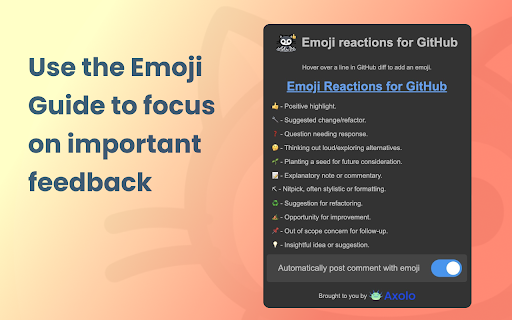
- ? Code Review Emoji Guide: Ensure meaningful emoji communication with our standardized guide, available at Code Review Emoji Guide https://github.com/axolo-co/developer-resources/tree/main/code-review-emoji-guide.
? Easy Installation:
Find us on the Chrome Web Store and add a new dimension to your code reviews.
? Simple Usage:
1. Open a GitHub pull request or code review.
2. Hover to reveal the emoji picker on any line of code.
3. Select and click an emoji to add it as a comment.
The Emoji reactions for GitHub is all about making code reviews more efficient, expressive, and engaging. Try it today and transform your review process!
? Support and Contact Information:
For assistance, queries, or feedback, please reach out to us at [email protected]. We can't wait to receive your feedback to improve this project even more!
?? Developer Information:
Emoji reactions for GitHub is developed by Axolo, a company committed to enhancing engineering team collaboration and efficiency. Learn more about us on https://axolo.co
| 分类 | 💻开发者工具 |
| 插件标识 | lpnemaljfnjdoiinabghjhlfekceakpf |
| 平台 | Chrome |
| 评分 |
★★★★★
5
|
| 评分人数 | 2 |
| 插件主页 | https://chromewebstore.google.com/detail/emoji-reactions-for-githu/lpnemaljfnjdoiinabghjhlfekceakpf |
| 版本号 | 1.4 |
| 大小 | 597KiB |
| 官网下载次数 | 71 |
| 下载地址 | |
| 更新时间 | 2024-07-31 00:00:00 |
CRX扩展文件安装方法
第1步: 打开Chrome浏览器的扩展程序
第2步:
在地址栏输入: chrome://extensions/
第3步: 开启右上角的【开发者模式】
第4步: 重启Chrome浏览器 (重要操作)
第5步: 重新打开扩展程序管理界面
第6步: 将下载的crx文件直接拖入页面完成安装
注意:请确保使用最新版本的Chrome浏览器
同类插件推荐

Emoji reactions for GitHub
Add emoji reactions to GitHub code diffs? Emoji re

Travel Compare by Olamgo
You’re looking for the perfect hotel stay to relax

Figma to Tokens
Connect to Figma API and preview a color palette a

Magento 2 images replace tool
Magento 2 tool to reload images from alternative d

ChatGPT Search Bar & Send With Command Enter
ChatGPT Search Bar & Send With Command Enter M

Krunch
Shorten URLs like never beforeThis powerful chrome

uli
Moderate your Twitter FeedUse Uli to redact slurs

Linqbase - LinkedIn CRM & Outreach
Effortlessly collect, organize, and export detaile

Agency Toolchest
The Agency Toolchest Chrome Extension is used to s

Trello Bug Feature Colors
Sets colors on Trello cardsColors Trello cards tha

ViZBL - Get To Know Your Friends
Discover your friends' YouTube world. Get to k

Atfos
Atfos: x999 tool.Atfos stands for Automated Tool F

SharePrompts: Share your ChatGPT,Bard Prompts
SharePrompts is a Chrome extension that allows you