
Hashely Chrome Chrome 插件, crx 扩展下载

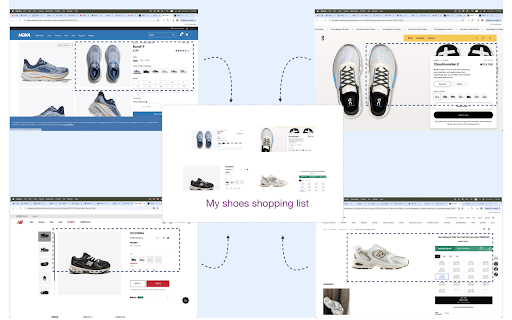
Pinterest with drag-selection
When you search, useful things you find are scattered all over the web.
Hashely allows you to save anything to your place, by drag-selection. Right click on anything, and click [ Save it to Hashely ] of the context menu. Drag the selector and adjust the area to save.
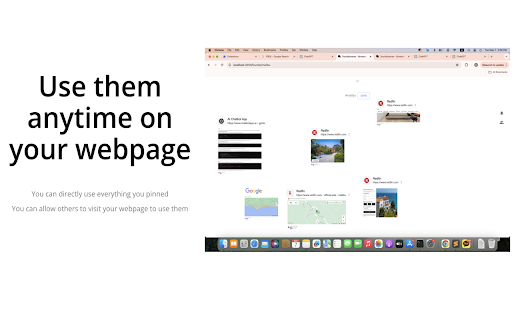
On your Hashely page(https://hashely.me/:your_name/:category), you can use everything you saved.
# Installing this extension restarts your chrome browser.
| 分类 | 📝工作流程与规划 |
| 插件标识 | malnhaodjdegcljjebmpopbjmckblndn |
| 平台 | Chrome |
| 评分 |
★★★★☆
4.4
|
| 评分人数 | 13 |
| 插件主页 | https://chromewebstore.google.com/detail/hashely-chrome/malnhaodjdegcljjebmpopbjmckblndn |
| 版本号 | 1.92 |
| 大小 | 1.15MiB |
| 官网下载次数 | 21 |
| 下载地址 | |
| 更新时间 | 2025-02-15 00:00:00 |
CRX扩展文件安装方法
第1步: 打开Chrome浏览器的扩展程序
第2步:
在地址栏输入: chrome://extensions/
第3步: 开启右上角的【开发者模式】
第4步: 重启Chrome浏览器 (重要操作)
第5步: 重新打开扩展程序管理界面
第6步: 将下载的crx文件直接拖入页面完成安装
注意:请确保使用最新版本的Chrome浏览器
同类插件推荐

ShadowLink
Make your professional social network professional

Hashely Chrome
Pinterest with drag-selectionWhen you search, usef

Cat Facts
Are you a cat lover? Do you want to learn somethin

UndoFlow
Brings back the undo and redo buttons in Webflow D

Faro
Save pages with highlighted taglines - Bookmark ma

SyntheticEye AI Detector
SyntheticEye provides a tool to detect potentially

The Business Community
The community for connections & contacts, busi

LeadhuntAI - Chrome Extension
This extension will allow you to easily retrieve s

Chatin for Problem Analysis
This extension enables Design Science Research thr

Michael's Upgrade for TrakED
Upgraded features for TrakED in the THS. (This ext

GimmeThat - Universal Wishlist for Shopping
Simplify shopping with a universal wishlist. Save

Apiary - Web Highlighter & Annotator
Highlight and take notes directly on what you read

Circle of Trust
LinkedIn business networking extension for entrepr