
SERP-Highlighter Chrome 插件, crx 扩展下载

SERP-Highlighter!
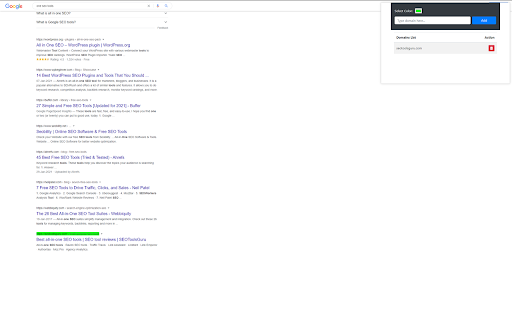
While searching a query or a keyword in search engines, we often search a relevant site, which takes a lot of time. By using our highlighter extension, you can quickly find the site you're in search of.
Moreover, This extension can highlight your website's domain to find the SERP ranking for a particular keyword.
For Instance
You want to find your site's ranking for a keyword like "Kesha Net Worth", or you need a trustworthy site to get accurate information; suppose your site's domain name is "thelistli.com." After that, the SERP highlighter will highlight your domain in search results.
How to use SERP Highlighter?
By using the following steps, you can use our highlighter extension:
Step 1:
Download the extension and pin it to your browser's bar menu.
Step 2:
Add the domain name in the search bar that you want to highlight in SERP.
Step 3:
Click to add button --> your domain will be added and displayed in the domain list.
Step 4:
To see the highlighted domain, type the keyword or query in your search engine's quest bar menu.
Step 5:
Locate the highlighted domain in the search results.
Note: You can add and highlight multiple domains for a particular query or keyword. e.g., you can add and highlight "wikipedia.com", "thelistli.com" for a particular search query, e.g. "Kesha Net Worth."
How to change SERP Highlighter color?
You can change the color of the highlighter as per your choice by using the following steps listed below:
Step 1:
After adding the domain name in the search bar, you want to highlight in SERP.
Step 2:
Click on the select color option located above the search bar of the extension.
Step 3:
After clicking on the option, a window will appear in the extension having a multiples option.
Step 4:
Select the color directly from the bar using the pointer located inside the bar; after selecting a color, click outside the bar. The extension will automatically save the color. Or, if you want to add the color code, jump to the next step.
Step 5:
To add a color code, click on the small arrow located at the left corner of a pop-up window.
Step 6:
Go to the HEX setting. Add the color code manually. Press the enter button --> your selected color will appear on the extension's screen and automatically saved.
Key Features of SERP highlighter
• Instantly find the ranking of your domain on a particular keyword by highlighting it.
• Compare the ranking difference by adding multiple sites (site of your competitors) to it.
• Find the site quickly on SERP that you want to surf.
• Change the color of the highlighter.
• Add or delete the domains easily.
• Easy and effective to use.
• Once the domain is added, you can see the highlighted domain anytime in SERP (you don't have to open an extension again and again).
Conclusion
If you're looking for the best domain highlighter for SERP, then this is a tool made for you. Download it now and find your highlighted domain instantly in search results.
To look at our privacy policy, feel free to click here and lets us know about your reviews and recommendations.
| 分类 | 👥社交 |
| 插件标识 | mcehpkjkhpepkhpapkklmpjnncelihan |
| 平台 | Chrome |
| 评分 |
★★★★★
5
|
| 评分人数 | 14 |
| 插件主页 | https://chromewebstore.google.com/detail/serp-highlighter/mcehpkjkhpepkhpapkklmpjnncelihan |
| 版本号 | 1.5 |
| 大小 | 92.08KiB |
| 官网下载次数 | 259 |
| 下载地址 | |
| 更新时间 | 2023-05-20 00:00:00 |
CRX扩展文件安装方法
第1步: 打开Chrome浏览器的扩展程序
第2步:
在地址栏输入: chrome://extensions/
第3步: 开启右上角的【开发者模式】
第4步: 重启Chrome浏览器 (重要操作)
第5步: 重新打开扩展程序管理界面
第6步: 将下载的crx文件直接拖入页面完成安装
注意:请确保使用最新版本的Chrome浏览器
同类插件推荐

Shane's SERP Highlighter
Shane's SERP HighlighterA simple plugin that c

Keywords Highlighter
a chrome extension that highlights keywords on web
SERP-Highlighter
SERP-Highlighter!While searching a query or a keyw
Marka
Web Page Marker, Keyword Highlighter, Saver★ Mark
Google Result Highlighter
Highlight google search results from trusted websi

Persistent Highlighter
A watered-down port of Prostetnic HighlighterSo fa

Highlighter + Notes
Highlighter and Notes for WebpagesHighlight import
Selection Highlighter
Highlight occurrences of selected text, with or wi

SERP Sonar
The Ultimate SERP Analysis ToolOverview SERP Sonar

Highlight
Supercharge Google Docs with text-synced audio rec

Auto Highlight
Auto Highlight 将自动突出显示指定页面上的指定字词? Auto Highlight将自

Search and Highlight
This extension highlights the specified word. You

MST SERP Counter - SEO Free SERP Checker Tool
SERP Counter gives accurate search result of searc