
Core Web Vitals Visualizer Chrome 插件, crx 扩展下载
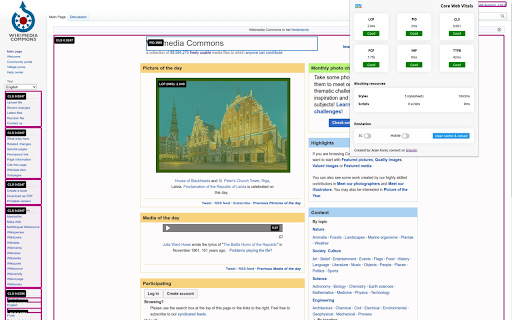
Visualize the Core Web Vitals of any webpage
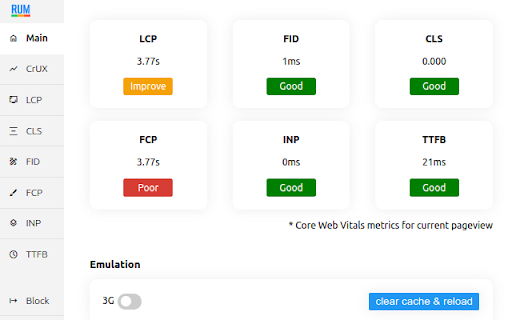
RUM Visualizer visualizes the Core Web Vitals for any webpage.
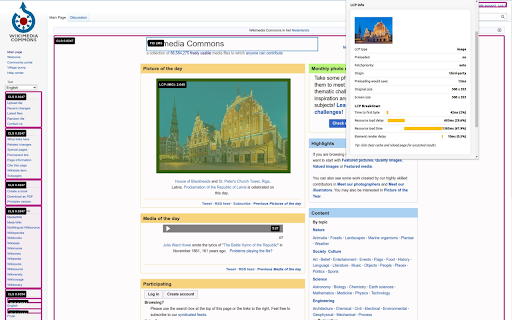
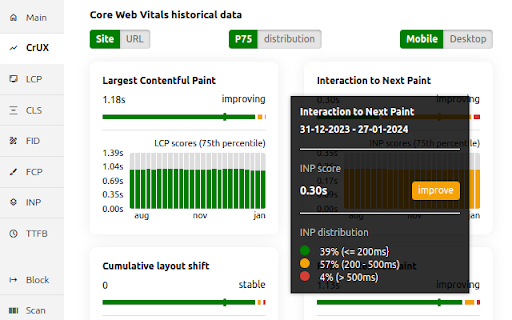
This extension will visualize the Core Web Vitals for any webpage. It includes the Largest Contentful Paint (LCP), First Input Delay (FID), Cumulative layout Shift (CLS), First Contentful Paint (FCP), Interaction to Next Paint (INP) and the Time To First Byte (TTFB). Get direct access to the Core Web Vitals historical data!
Features:
LCP
- Get LCP RUM values
- Visualize the LCP.
- Break down the LCP into Time to first byte, Resource load delay, Resource load time and Element render delay
INP
- Get INP RUM values
- Visualize the INP.
- INP breakdown
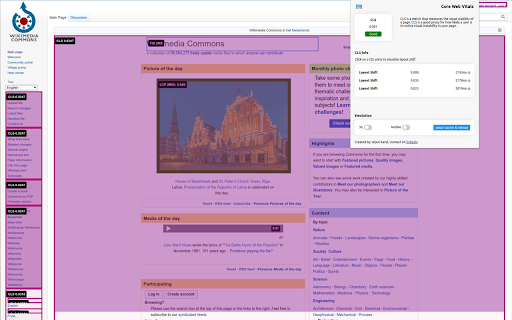
CLS
- Get CLS RUM values
- Show CLS breakdown
- Visualize the CLS
- Animate the CLS.
FCP
- Get FCP RUM values
- break down the FCP
TTFB
- get TTFB RUM values
- breakdown the TTFB
Easy debugging:
- Emulate slow network conditions (3g).
- Enable or disable Caching for the current page.
changes:
1.12 Better messaging + improved elementtiming, better logging to console
1.11 Removed the FID, the Web Vitals are now based upon the upcoming v4 of the web vitals library, new breakdown details, improved CSS visualization, small bugfixes, code cleanup.
1.10 Promote INP to a Core Web Vitals and demote FID to a metric of interest!
1.9 CrUX history API, small fixes, more CLS info
1.8 Better metric updates, better logging, minor improvements
1.7 Log Events, Long Tasks and Long Animation Frames to the console that happen during and might interfere with the INP.
1.6 Better INP Breakdown, minor code improvements.
1.5 code improvements, layout improvements, added page experiments (defer javascript, disable javascript, disable third party scripts, lazy load images, defer background images & disable webfonts).
1.4 left side menu, more information about render blocking resources and direct links to PSI, CrUX dashboard and W3C.
1.2 added lots of LCP information like preloading, fetchpriority, rendering breakdown, first or third party etc.
| 分类 | 💻开发者工具 |
| 插件标识 | mcffmgagphgpgkdclllnilokablhjcge |
| 平台 | Chrome |
| 评分 |
★★★★☆
4.4
|
| 评分人数 | 11 |
| 插件主页 | https://chromewebstore.google.com/detail/core-web-vitals-visualize/mcffmgagphgpgkdclllnilokablhjcge |
| 版本号 | 1.12 |
| 大小 | 2.39MiB |
| 官网下载次数 | 6000 |
| 下载地址 | |
| 更新时间 | 2024-06-06 00:00:00 |
CRX扩展文件安装方法
第1步: 打开Chrome浏览器的扩展程序
第2步:
在地址栏输入: chrome://extensions/
第3步: 开启右上角的【开发者模式】
第4步: 重启Chrome浏览器 (重要操作)
第5步: 重新打开扩展程序管理界面
第6步: 将下载的crx文件直接拖入页面完成安装
注意:请确保使用最新版本的Chrome浏览器
同类插件推荐

SEO Elements Checker
Identify on-page SEO elements on any website.RBBI

Meta Debugger
Debug the head elements of any webpage in a comfor

Visual Inspect UI
Advanced Visual Inspector for Editing Web Page Ele
Core Web Vitals Visualizer
Visualize the Core Web Vitals of any webpageRUM Vi