
ScreenMaster Chrome 插件, crx 扩展下载
ScreenMaster: Effortless Screen Recording
ScreenMaster is a convenient Google Chrome extension that enables easy screen recording on your computer. It's a perfect tool for creating educational materials, demonstration videos, or workflows recordings. With its ease of use and a variety of features, it's a great choice for both professionals and casual users.
Features:
Ease of Use: Simply click on the extension icon in your browser to start recording.
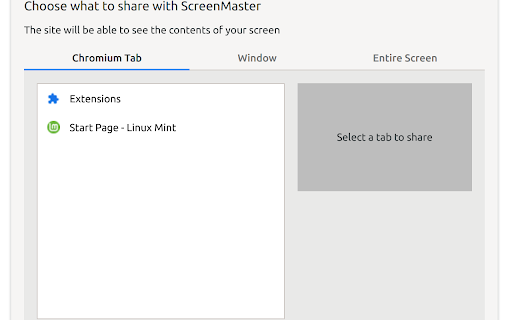
Selectable Recording Area: You can choose to record your entire screen, a specific window, or a browser tab.
High-Quality Recording: The extension supports high-resolution recording, ensuring clear video quality.
No Need for Downloads: All recordings are done directly in the browser, eliminating the need for downloading additional software.
Easy Sharing of Recordings: Recorded videos can be easily saved to your computer or shared via social media or email.
This extension is ideal for teachers, marketers, developers, and anyone looking for an easy way to make screen recordings.
| 分类 | 🛠️工具 |
| 插件标识 | melpmmbofpojhebogikjkjbfbflocllg |
| 平台 | Chrome |
| 评分 |
★★★★☆
4.7
|
| 评分人数 | 897 |
| 插件主页 | https://chromewebstore.google.com/detail/screenmaster/melpmmbofpojhebogikjkjbfbflocllg |
| 版本号 | 1.0.0 |
| 大小 | 56.15KiB |
| 官网下载次数 | 41 |
| 下载地址 | |
| 更新时间 | 2023-12-10 00:00:00 |
CRX扩展文件安装方法
第1步: 打开Chrome浏览器的扩展程序
第2步:
在地址栏输入: chrome://extensions/
第3步: 开启右上角的【开发者模式】
第4步: 重启Chrome浏览器 (重要操作)
第5步: 重新打开扩展程序管理界面
第6步: 将下载的crx文件直接拖入页面完成安装
注意:请确保使用最新版本的Chrome浏览器
同类插件推荐
ScreenMaster
ScreenMaster: Effortless Screen RecordingScreenMas

Screenly : Screenshot & Screen Video Recorder
Record videos and take screnshots from your screen

Live Screen Recorder
Effortlessly Record Your Screen with the Live Scre
截圖工具
屏幕捕获和屏幕录制工具以记录屏幕。充分利用您的屏幕捕获!免费截取屏幕快照。Introducing t