
YouTube H264ify Chrome 插件, crx 扩展下载
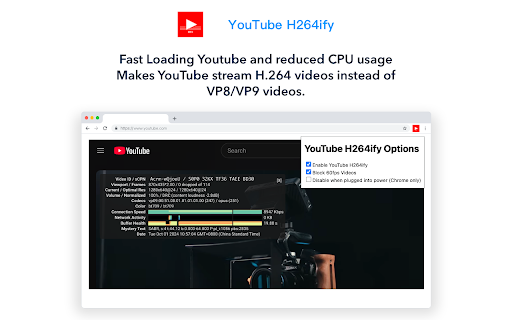
Makes YouTube stream H.264 videos instead of VP8/VP9 videos
YouTube H264ify is a Chrome extension that makes your YouTube video playback smoother! ?
? By default, YouTube streams videos in VP8/VP9 encoding, which can cause high CPU usage, stuttering, or even make your device overheat. H264ify helps switch the video stream to the more commonly hardware-accelerated H.264, resulting in smoother playback, reduced CPU usage, and extended battery life. ?
? Features:
Automatically switches YouTube video streams to H.264 to reduce CPU usage
Enhances video playback smoothness and minimizes stuttering
Lowers battery consumption on laptops and mobile devices
Experience a smoother YouTube journey with YouTube H264ify! ?
——————————————————
YouTube H264ify 是一款可以让您的 YouTube 视频播放更加流畅的插件!?
?默认情况下,YouTube 会以 VP8/VP9 编码播放视频,这可能会导致某些电脑的 CPU 占用率过高、卡顿、甚至让设备过热。H264ify 可以帮助您将视频流切换为更常见的 H.264 编码,从而实现硬件加速,让视频播放更加顺畅,降低 CPU 占用率,并延长电池续航时间。?
? 特点:
自动将 YouTube 视频流切换为 H.264 编码,减少 CPU 使用
提升视频播放流畅度,减少卡顿
降低笔记本和移动设备的电池消耗
让您的 YouTube 体验更加丝滑流畅,立即安装 YouTube H264ify!?
| 分类 | 📝工作流程与规划 |
| 插件标识 | mgfcnjdfafedpjfaikgcplamfoehljbd |
| 平台 | Chrome |
| 评分 |
★★★★☆
4.1
|
| 评分人数 | 647 |
| 插件主页 | https://chromewebstore.google.com/detail/youtube-h264ify/mgfcnjdfafedpjfaikgcplamfoehljbd |
| 版本号 | 1.1.0 |
| 大小 | 13.22KiB |
| 官网下载次数 | 211 |
| 下载地址 | |
| 更新时间 | 2024-10-01 00:00:00 |
CRX扩展文件安装方法
第1步: 打开Chrome浏览器的扩展程序
第2步:
在地址栏输入: chrome://extensions/
第3步: 开启右上角的【开发者模式】
第4步: 重启Chrome浏览器 (重要操作)
第5步: 重新打开扩展程序管理界面
第6步: 将下载的crx文件直接拖入页面完成安装
注意:请确保使用最新版本的Chrome浏览器
同类插件推荐

Time Viewer for YouTube Live
Chrome Extension for Viewing Time on YouTube Live.

h264ify
Makes YouTube stream H.264 videos instead of VP8/V
YouTube H264ify
Makes YouTube stream H.264 videos instead of VP8/V

Auto Resolution Quality for YouTube™
自动以首选质量播放 YouTube™ 视频。Tired of YouTube™ videos not

Auto HD 720p/1080p
Watch videos automatically in HD quality! Supporte

Simple Auto HD (Open Source)
Simple Auto HD quality selector for YouTube. Up to

适用于Youtube™的自动高清/自动4K
YouTube的简单Auto HD质量选择器。最高支持8k / 4k(60fps / 50fps /
H264ify With Auto 1080
H264ify with Auto 1080 Chrome Extension saves you

Bideo Max:适用于 YouTube 等的自动 8K/4K/HD
在 YouTube、Crunchyroll、VRV 等上自动设置最高视频质量!无需手动调整即可享受无

enhanced-h264ify
Choose what video and audio codecs YouTube should

Red Messenger for Youtube
Youtube Lite for Chrome. Magic actions, Ad block.

YouTube Tweaks
A collection of tweaks for hiding Shorts, disablin

youtube-video-quality-fixer
Chrome Extension for Fixing Highest Video Quality