
下载 Chrome 插件, crx 扩展下载
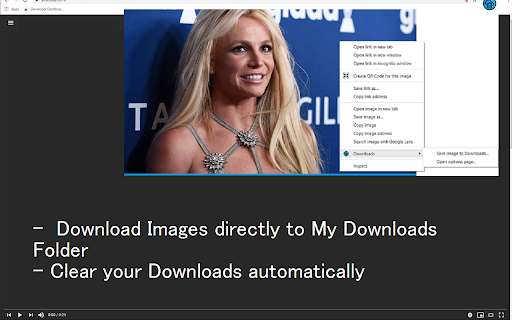
清除所有已完成下载的下载列表。将图像保存在下载中。打开下载。
Try this simple manager for my downloads today.
Here are the core features of this Downloads software.
- Quick access to the Downloads browser page when you click on the extension icon
- It allows you to auto clear your Downloads folder every 20 seconds. This time duration can be set by you via the options page.
- Use the context menu to save any images you want to My Downloads folder.
To access the options page for this extension, simply right click, choose "Downloads" and then mouse over the "Options page" button.
Save time managing your downloads today by using this simple downloads software.
| 分类 | 📝工作流程与规划 |
| 插件标识 | miiggjhfiganjofhpckipgglilmgckcb |
| 平台 | Chrome |
| 评分 |
★★★★★
5
|
| 评分人数 | 1 |
| 插件主页 | https://chromewebstore.google.com/detail/下载/miiggjhfiganjofhpckipgglilmgckcb |
| 版本号 | 3.0.2 |
| 大小 | 137KiB |
| 官网下载次数 | 10000 |
| 下载地址 | |
| 更新时间 | 2022-05-23 00:00:00 |
CRX扩展文件安装方法
第1步: 打开Chrome浏览器的扩展程序
第2步:
在地址栏输入: chrome://extensions/
第3步: 开启右上角的【开发者模式】
第4步: 重启Chrome浏览器 (重要操作)
第5步: 重新打开扩展程序管理界面
第6步: 将下载的crx文件直接拖入页面完成安装
注意:请确保使用最新版本的Chrome浏览器
同类插件推荐

下载
清除所有已完成下载的下载列表。将图像保存在下载中。打开下载。Try this simple mana

“我的下載”
通過我們的簡單的一鍵式擴展訪問您的谷歌Chrome瀏覽器的下載。Access all of your

设置
通过此扩展程序,您只需单击一下即可转到Google Chrome的设置。此扩展程序使您只需单击一下即

Downloads
Conveniently clear your Downloads history此扩展程序使您只需

下载
访问此设备上的下载内容。使用下载链接在 Chrome 中管理下载的文件?Downloads 是您管理

Downloads
Quick access button to the download pageQuickly ac

My Downloads Button - 打开浏览器下载
一键打开您的网络浏览器下载页面。 快速查找下载文件的简单方便的方法。??? 我的下载按钮:是一个网络

Chrome 下载
访问 chrome 下载。打开下载文件夹并整理 google chrome 下载? 如果没有合适的工

Clipbox Tab
Clipbox Tab is a Chrome Extension for the New TabF

Sync Watch
Watch videos together at the same time!SyncWatch a

LikeBoost | Free Likes
Boost your social account and get likes on yours p

使用免费下载管理器下载
在下载管理器中轻松打开所需的链接使用您喜欢的下载软件来管理您从Google Chrome浏览器中的下

Google Chrome的免费下载管理器。
轻松管理和加速下载最多5次!我们的Google Chrome™免费下载管理器将使您下载所有类型的文件