
Cinematic for YouTube™ Chrome 插件, crx 扩展下载


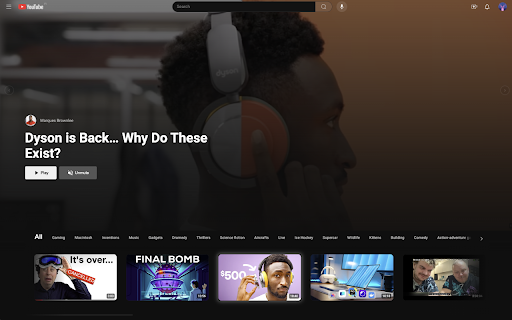
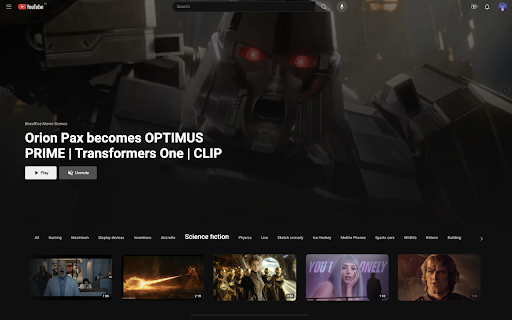

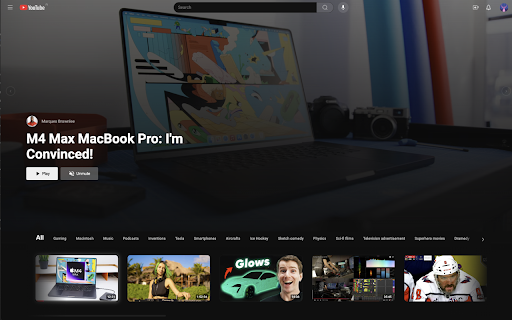
Transform your YouTube into a Netflix-style experience with cinematic video previews and an immersive browsing experience.
? Cinematic helps you discover your next binge-worthy videos effortlessly with a sleek, distraction-free interface and auto-playing previews. It redefines how you explore content, making every interaction more engaging and fun.
✨ Key Features
• Cinematic previews: Auto-playing video previews that help you discover content faster.
• Immersive interface: A Netflix-inspired design that makes browsing more engaging.
• Smart hover: Seamlessly preview videos by hovering, with smooth transitions.
• Distraction-free: A clean interface with no shorts, banners, or unnecessary clutter.
? What You Get
• A Netflix-inspired browsing experience tailored for YouTube
• Smooth animations and seamless video previews
• Enhanced content discovery, making it easier to decide what to watch next
• A beautiful, immersive interface that makes every scroll enjoyable
❤️ Why You’ll Love It
Cinematic is perfect for anyone who loves the simplicity and elegance of Netflix's browsing experience but wants to explore YouTube’s endless variety of content. It turns endless scrolling into a fun and engaging way to discover your next favorite videos.
? Private by Design
Your privacy matters. Cinematic is completely free to use and operates entirely in your browser – no data collection, no external services, no compromises.
---
YouTube is a trademark of Google LLC. Netflix is a registered trademark of Netflix, Inc. This extension is not affiliated with or endorsed by Google LLC or Netflix, Inc.
| 分类 | ⚙️功能性 |
| 插件标识 | mjcmcohngplheajoacfhbdfdfagmgeig |
| 平台 | Chrome |
| 评分 |
★★★★☆
4.5
|
| 评分人数 | 5508 |
| 插件主页 | https://chromewebstore.google.com/detail/cinematic-for-youtube/mjcmcohngplheajoacfhbdfdfagmgeig |
| 版本号 | 1.1 |
| 大小 | 46.31KiB |
| 官网下载次数 | 171 |
| 下载地址 | |
| 更新时间 | 2024-11-26 00:00:00 |
CRX扩展文件安装方法
第1步: 打开Chrome浏览器的扩展程序
第2步:
在地址栏输入: chrome://extensions/
第3步: 开启右上角的【开发者模式】
第4步: 重启Chrome浏览器 (重要操作)
第5步: 重新打开扩展程序管理界面
第6步: 将下载的crx文件直接拖入页面完成安装
注意:请确保使用最新版本的Chrome浏览器
同类插件推荐
YouTube Livestreams Theater Mode
Improves the viewing experience of YouTube livestr

Cinematic for YouTube™
Transform your YouTube into a Netflix-style experi

Dmooji - YouTube 实时弹幕与互动评论
为 YouTube 带来全新互动体验,让观看更有趣,让交流更生动。? 让 YouTube 观看体验焕

TubeBuddy for YouTube™
Supercharge your YouTube channel: grow views and s