
ChatGPT Pro Chrome 插件, crx 扩展下载
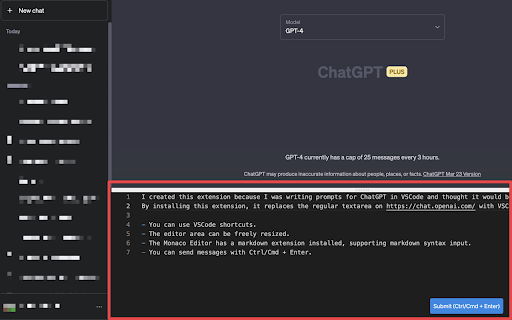

Introducing the VSCode-like Input for ChatGPT Chrome Extension
By installing this extension, it seamlessly replaces the standard…
Introducing the VSCode-like Input for ChatGPT Chrome Extension
By installing this extension, it seamlessly replaces the standard textarea on https://chat.openai.com/ with the VSCode (Monaco Editor).
Key features include:
・Access to VSCode shortcuts.
・Freely resizable editor area.
・Integration of the Monaco Editor markdown extension, enabling markdown syntax input.
・Ability to send messages using Ctrl/Cmd + Enter.
Please report any bugs or feature requests via https://github.com/hand-dot/chat-gpt-pro/issues .
Enhance your ChatGPT input experience with the convenience and versatility of the VSCode-like Input for ChatGPT Chrome Extension.
| 分类 | 📝工作流程与规划 |
| 插件标识 | mkiflddndppkblphffoppopiciiocpln |
| 平台 | Chrome |
| 评分 |
★★★★☆
4.8
|
| 评分人数 | 4 |
| 插件主页 | https://chromewebstore.google.com/detail/chatgpt-pro/mkiflddndppkblphffoppopiciiocpln |
| 版本号 | 1.0.8 |
| 大小 | 1.73MiB |
| 官网下载次数 | 875 |
| 下载地址 | |
| 更新时间 | 2023-05-31 00:00:00 |
CRX扩展文件安装方法
第1步: 打开Chrome浏览器的扩展程序
第2步:
在地址栏输入: chrome://extensions/
第3步: 开启右上角的【开发者模式】
第4步: 重启Chrome浏览器 (重要操作)
第5步: 重新打开扩展程序管理界面
第6步: 将下载的crx文件直接拖入页面完成安装
注意:请确保使用最新版本的Chrome浏览器
同类插件推荐
ChatGPT Pro
Introducing the VSCode-like Input for ChatGPT Chro

ChatGPT Wizard
Boost your browser with ChatGPT Wizard: instantly

ChatGPT Augment
Enhance chat with ChatGPT-Augment: auto-continue,

ChatGPT-Pro
A Chrome extension to display the token count for

GPT Code Reviewer
This extension enables users to upload files for C

ChatGPT Assistant Pro
a chrome extension to help you use ChatGPT more ef

TextGPT - Smarter Text Input by OpenAI
TextGPT: Your Virtual Co-Pilot for Smarter Text In

YouTube Chatbot extension by Audio2Doc
A chatbot for YouTube videos by Audio2Doc.comThis

RenderGPT
A Chrome extension to render HTML/JavaScript/CSS f

Syncia - Power of ChatGPT on any website
Syncia is a browser extension that allows you to u

ChatGPT AutoPrompt
Automatically insert a predefined text into every

ChatGPT Prompt List
A Chrome extension that allows you to create a lis

Chat with Desksense AI Powered by GPT4
The Ultimate AI Assistant with GPT-4 powered respo