
ChatGPT for Gmail Chrome 插件, crx 扩展下载

Your Email Generator for Gmail
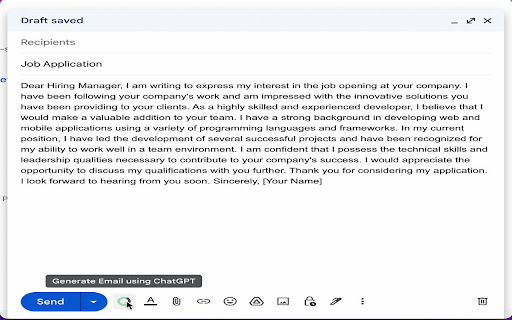
ChatGPT for Gmail is a chrome browser extension that generate email based on Email Subject or content in case of reply and directly insert into editor.
*How to Use
1. Write Subject and click on ChatGPT for Gmail icon.
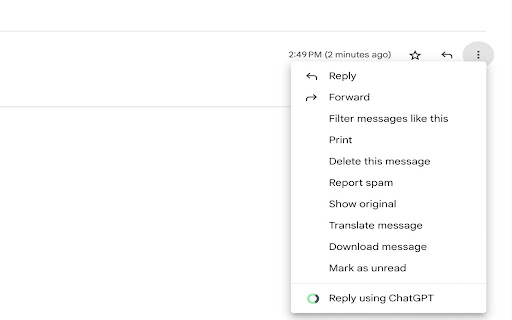
2. In case of Reply, click on 'More' icon and select reply using ChatGPT.
-----FAQ:-----
1. What is ChatGPT?
ChatGPT is a large language model developed by OpenAI. It is an artificial intelligence tool that is trained on a massive amount of text data and uses deep learning techniques to generate natural language responses to user queries. The name "GPT" stands for "Generative Pre-trained Transformer," which refers to the type of deep learning architecture used to train the model. ChatGPT is capable of answering a wide range of questions on various topics and engaging in natural language conversations with users. It is designed to continuously learn and improve over time, allowing it to provide increasingly accurate and informative responses.
2. What is ChatGPT for Gmail?
ChatGPT for Gmail is a chrome browser extension that generate email based on Email Subject and directly insert into editor.
3. Is ChatGPT for Gmail free to use?
Yes, the extension is free to use.
5. Do I need a ChatGPT/OpenAI account?
Yes, you need to have a ChatGPT account to use this extension. You can create an account for free at chat.openai.com.
| 分类 | 📝工作流程与规划 |
| 插件标识 | mllkpgcojiooenmengajhkailfjocond |
| 平台 | Chrome |
| 评分 |
★★★★☆
4.6
|
| 评分人数 | 460 |
| 插件主页 | https://chromewebstore.google.com/detail/chatgpt-for-gmail/mllkpgcojiooenmengajhkailfjocond |
| 版本号 | 1.0.1 |
| 大小 | 1.74MiB |
| 官网下载次数 | 19 |
| 下载地址 | |
| 更新时间 | 2023-03-07 00:00:00 |
CRX扩展文件安装方法
第1步: 打开Chrome浏览器的扩展程序
第2步:
在地址栏输入: chrome://extensions/
第3步: 开启右上角的【开发者模式】
第4步: 重启Chrome浏览器 (重要操作)
第5步: 重新打开扩展程序管理界面
第6步: 将下载的crx文件直接拖入页面完成安装
注意:请确保使用最新版本的Chrome浏览器
同类插件推荐
ChatGPT for Gmail
Your Email Generator for GmailChatGPT for Gmail is

ChatGPT for Gmail
Leverage the power of ChatGPT within your Gmail in

HTML Editor for Gmail by cloudHQ
Gmail™ 的免费 HTML 编辑器 - 直接从 Gmail 编码 HTML 电子邮件Do you

ChatGPT for Gmail by cloudHQ
直接从您的 Gmail 中轻松免费的在线投票和调查? 使用Gmail的ChatGPT为您的电子邮件游