
Fiori Launchpad Helper Chrome 插件, crx 扩展下载
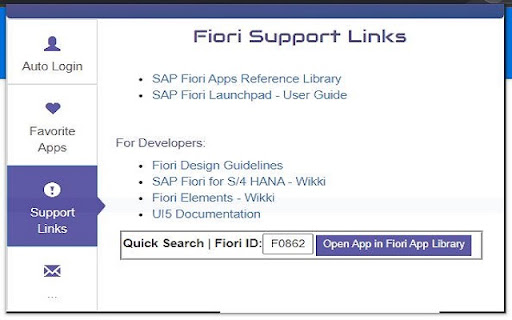
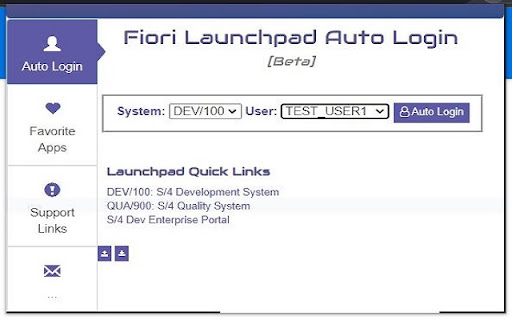
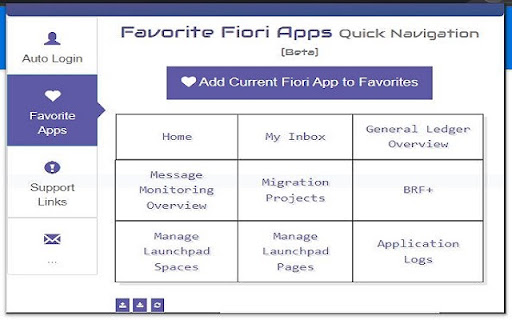
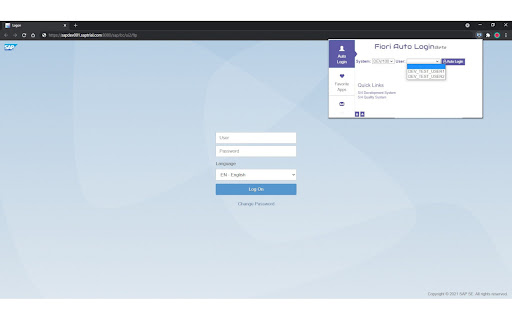
Fiori Launchpad Helper Extension
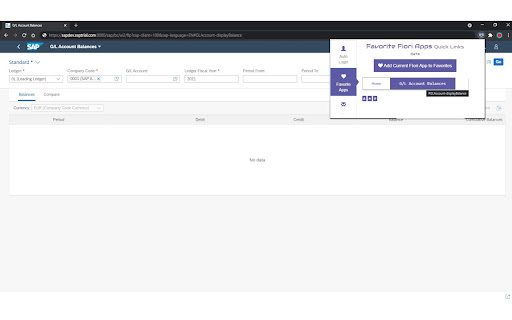
Chrome Extension that will help users to automatically login to SAP Fiori Launchpad with one click and can bookmark and navigate to frequently used Fiori apps.
This extension helps the users to quickly switch between different users and systems with one click without having to remember the login credentials or launchpad url's.
Also user's can bookmark any Fiori app and can navigate to the particular app with one click shortcuts.
The extension is mainly focused for developers, functional consultants and testers to increase productivity and to automate some frequent tasks.
User can upload the customized user config file which contains the system and login details to the extension with the help of the template file available to download within the extension.
*This extension does not save, collect or uploads any user data online, all the user data is saved locally in encrypted format.
Compatibility: S/4 HANA 2020OP , SAP Enterprise Portal 6.0
Note: This extension might not working if there is an organizational policy restricting access of internal domains by extensions.
Disclaimer: Fiori is a trademark of SAP and I am not directly associated with SAP.
| 分类 | 🛠️工具 |
| 插件标识 | mnapalcpbnknfpafoolfmefgkgebjpee |
| 平台 | Chrome |
| 评分 |
★★★★★
5
|
| 评分人数 | 2 |
| 插件主页 | https://chromewebstore.google.com/detail/fiori-launchpad-helper/mnapalcpbnknfpafoolfmefgkgebjpee |
| 版本号 | 1.09 |
| 大小 | 105KiB |
| 官网下载次数 | 184 |
| 下载地址 | |
| 更新时间 | 2024-01-10 00:00:00 |
CRX扩展文件安装方法
第1步: 打开Chrome浏览器的扩展程序
第2步:
在地址栏输入: chrome://extensions/
第3步: 开启右上角的【开发者模式】
第4步: 重启Chrome浏览器 (重要操作)
第5步: 重新打开扩展程序管理界面
第6步: 将下载的crx文件直接拖入页面完成安装
注意:请确保使用最新版本的Chrome浏览器
同类插件推荐

UI5 Deprecated Control Checker
Scan the page for deprecated UI5 controls.This ext

Fiori Launchpad for SAP S/4HANA
Fiori Launchpad, Browser Extension for SAP S/4HANA

SAP Anywhere sidebar for Gmail
Connect SAP Anywhere to your Gmail, Contacts and C

Get SAP Fiori Client
Retrieve the session SAP Fiori ClientThis extensio

SAP Mini Launchpad
SAP Mini LaunchpadSAP Mini Launchpad direct links

Fiori Launchpad Helper
Fiori Launchpad Helper ExtensionChrome Extension t

SAP Addon
Extension for SAP internal webpages: GitHub, Share

ILSA TabSafe
An extension to provide window isolation. Injects

copy paste form value
Alt + i to copy form values, Alt + o to paste them

Clear Portal Cache
Clearing the cache with a single click!Easily clea

Tanuki Utilities
Provide useful utilities for GitLab users.Title ch

Cards & Colors
Extension enhances visibility to issues and cards

Apache KIE™ Serverless Workflow Editor for GitHub
Visualize and edit Serverless Workflow files using