
PINSPY - Ad Finder Chrome 插件, crx 扩展下载


Find & Collect Ads from your feed and searches
PINSPY Ad Finder - the perfect solution for collecting, saving, and hunting trending Pinterest Ads automatically from your news feed. With our extension, you can effortlessly collect and save ads from your Pinterest news feed and tag your favourite ads.
To discover even more ads, simply keep scrolling and refreshing your news feed. PINSPY is the ideal free tool for spying on your competitors' ads and finding inspiration for your next ad campaign. This automatic Pinterest Ad saver allows you to aggregate ads into a single list, tag your favourite ads, and access your list anytime.
Plus, it makes it easy to look for ads in specific niches or keywords. Simply type in any keyword on Pinterest and start the extension to collect Ads. So why wait? Start building your Ad-database with PINSPY now!
The Features
★Automatically collect and save all the ads you see on your Pinterest news feed, and aggregates them on an easy-to-read list that is hosted locally in your Chrome.
★With just one click on the "favourite" button, you can add ads that interest you to your list of favourite items. You can later find and supervise all your collected and favourite ads from the collected ads page.
★To help you find ads quickly, the tool allows you to search on specific keywords and collect ads from that particular search.
★To work even faster and use your time efficiently, our tool has an automatic scroll function so you can sit down and watch the ads flowing in.
★Presents all sniped ads in a single list, making it easy for you to compare ads against each other.
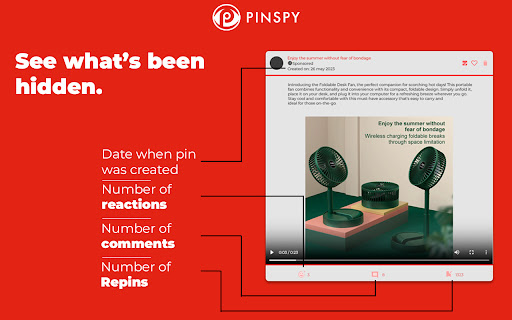
★We break down Pinterest ads by their structural data, allowing you to see the ad's image/thumbnail, page link, headlines and ad copy.
| 分类 | 🛠️工具 |
| 插件标识 | ncdloiiakanejjaddfmbnneiepmalepc |
| 平台 | Chrome |
| 评分 |
★★★★☆
4.6
|
| 评分人数 | 546 |
| 插件主页 | https://chromewebstore.google.com/detail/pinspy-ad-finder/ncdloiiakanejjaddfmbnneiepmalepc |
| 版本号 | 1.0.5 |
| 大小 | 275KiB |
| 官网下载次数 | 1000 |
| 下载地址 | |
| 更新时间 | 2024-10-25 00:00:00 |
CRX扩展文件安装方法
第1步: 打开Chrome浏览器的扩展程序
第2步:
在地址栏输入: chrome://extensions/
第3步: 开启右上角的【开发者模式】
第4步: 重启Chrome浏览器 (重要操作)
第5步: 重新打开扩展程序管理界面
第6步: 将下载的crx文件直接拖入页面完成安装
注意:请确保使用最新版本的Chrome浏览器
同类插件推荐

PINSPY - Ad Finder
Find & Collect Ads from your feed and searches

Pinterest Ads Only
Remove every post which is not 'promoted'

Pinterest Tag Helper
A tool to help you build, troubleshoot and test yo

Pinterest sort extension - SortPin.com
The Easiest Way to Sort Your Pinterest Pins Automa

Dropship - Product Research
Monitor the sales revenue of e-commerce stores and

Ad Library downloader
Spy on your competitor's ads by saving their a

Ad Library - Save Facebook TikTok - Foreplay
Save ads from TikTok and Facebook Ad Library with

AdSparo - AdLibrary Ad Finder & Ad spy Tool
The Best Free Ad spy tool for Facebook Ads Library

SimplyTrends - Shopify Spy & Dropship Scraper
Free all-in-one Shopify inspector, spy, parser, an

广告素材库 | 管理工具 | 一键保存FB和TT视频广告 - Denote
一键保存各种广告素材库的资源,免费跟踪竞争对手的广告,包括FB广告素材库、TK广告资料库等,并且提供

Shopify Spy & Dropship Tool - Koala Inspector
Shopify spy and Dropshipping tool for eCommerce &a

Aliexpress Search by image
Search goods on Aliexpress by imageSearch items on

PPSPY-#1 Shopify analytics & dropship tool
PPSPY provides store analytics, shopify store sale