JobJump - AI Interview Copilot Chrome 插件, crx 扩展下载
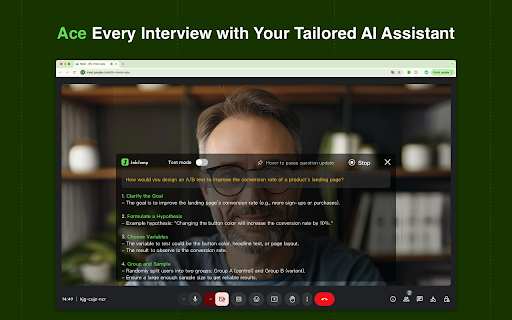

Your AI copilot for online interviews, which identifies questions and suggests answers based on your experience and job requirements
Elevate your interview performance with JobJump, your real-time AI-powered assistant designed to help you excel during video interviews. Our AI Copilot provides tailored answer suggestions, whether you're answering questions or tackling coding challenges, ensuring you're fully prepared and confident to ace your interview and land your dream job.
? Seamless Integration
Integrates directly with video conferencing platforms like Zoom, Google Meet, and Microsoft Teams, providing assistance without disrupting your interview or requiring you to leave the page.
? Real-Time AI Assistance
Transcribes the interviewer's questions and offers instant answer hints, enabling you to craft well-informed and articulate responses in real time.
? Visual Recognition
Automatically generates answer hints after a single screenshot, empowering you to ace coding interviews and online assessments effortlessly.
? Interview Report
Records the entire interview process, allowing you to review and reflect at any time. Additionally, it provides AI-powered analysis and evaluation of your answers, offering valuable insights and suggestions for improving future interviews.
? Effortless Interaction
Enables click-free interaction, allowing you to engage confidently with the interviewer, enhancing your overall interview experience.
For any questions or support, please contact us at [email protected].
| 分类 | 💬沟通 |
| 插件标识 | ndnijdpeemcjongapibpkoclhleoajnd |
| 平台 | Chrome |
| 评分 |
★★★★☆
4.9
|
| 评分人数 | 2650 |
| 插件主页 | https://chromewebstore.google.com/detail/jobjump-ai-interview-copi/ndnijdpeemcjongapibpkoclhleoajnd |
| 版本号 | 1.4.2 |
| 大小 | 695KiB |
| 官网下载次数 | 993 |
| 下载地址 | |
| 更新时间 | 2025-02-20 00:00:00 |
CRX扩展文件安装方法
第1步: 打开Chrome浏览器的扩展程序
第2步:
在地址栏输入: chrome://extensions/
第3步: 开启右上角的【开发者模式】
第4步: 重启Chrome浏览器 (重要操作)
第5步: 重新打开扩展程序管理界面
第6步: 将下载的crx文件直接拖入页面完成安装
注意:请确保使用最新版本的Chrome浏览器