
Chrome ChatGPT Helper Chrome 插件, crx 扩展下载
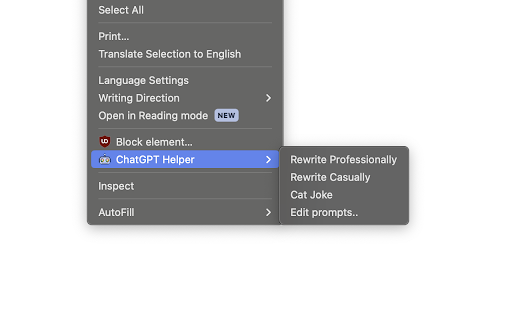

Create ChatGPT prompts, and execute them via the right click menu.
Tired of copy pasting text into ChatGPT? Tired of switching tabs? Do you wish you could just run a prompt within Chrome with just a click? Well now you can!
Chrome ChatGPT helper is a Google Chrome extension that adds customisable ChatGPT prompts to your Chrome right click menu. You can use these prompts to replace your selected text with the prompt of your choosing. Example usages are rewriting your mail in a professional manner, or generating a joke, right inside your text field.
This extension is completely open source, and does not contain any tracking, nor collect any data. See the source code here: https://github.com/umutseven92/chrome-chatgpt-helper
Configuration:
After installing the extension, click on the extension icon on the top right and click Options. Alternatively, right click on the web page, and click Edit Prompts. This will open the Options page for the extension.
OpenAI API Key:
If your don't have an OpenAI account, please create one, generate an OpenAI API Key, then paste the Secret Key here. Keep this key secret!
Make sure you have enough credits in your account. It is also a good idea to set usage limits, so you don't encounter any surprises!
Model:
Choose your model. GPT-4 is smarter, but more expensive than GTP-3.5 Turbo. See here for pricing details.
Prompts:
Click Add Prompt to add a new prompt. Make sure that your prompt names are unique. Click Delete Prompt to delete the prompt.
When a prompt is run via the right-click menu, your text selection will be replaced by the prompt result, and your original selection will be copied to the clipboard, so you can press Ctrl + V to get it back. You can use $selection inside your prompts to insert the selected text into the prompt, please see the built-in prompts for examples.
When using this extension with Reddit, please switch to Markdown Mode first, as Reddit's "fancy" editor has issues with handling paste events.
Keep in mind that changes won't be saved until the Save button is clicked!
Disclaimer:
This extension bridges Google Chrome to ChatGPT; we are not responsible for what ChatGPT might generate. You are responsible for any costs incurred by using this extension- this extension is free, but ChatGPT itself isn't. Like mentioned above, set usage limits to avoid being overcharged. This extension does not collect any data whatsoever, nor does it contain any tracking.
| 分类 | 🛠️工具 |
| 插件标识 | nfjkcalamkcnfnppjckcbfihcdcpbajd |
| 平台 | Chrome |
| 评分 |
★★★★☆
4.3
|
| 评分人数 | 160 |
| 插件主页 | https://chromewebstore.google.com/detail/chrome-chatgpt-helper/nfjkcalamkcnfnppjckcbfihcdcpbajd |
| 版本号 | 1.5 |
| 大小 | 23.99KiB |
| 官网下载次数 | 37 |
| 下载地址 | |
| 更新时间 | 2024-04-13 00:00:00 |
CRX扩展文件安装方法
第1步: 打开Chrome浏览器的扩展程序
第2步:
在地址栏输入: chrome://extensions/
第3步: 开启右上角的【开发者模式】
第4步: 重启Chrome浏览器 (重要操作)
第5步: 重新打开扩展程序管理界面
第6步: 将下载的crx文件直接拖入页面完成安装
注意:请确保使用最新版本的Chrome浏览器
同类插件推荐
Chrome ChatGPT Helper
Create ChatGPT prompts, and execute them via the r

EasyGPT
A Chrome extension that generates personalized Lin

ChatGPT to Help
在搜索引擎结果中同时显示ChatGPT的回答With the ChatGPT2Help extens

ChatGPT Organizer
Chrome extension To organize chats in ChatGPTChatG