
Show Youtube Email Chrome 插件, crx 扩展下载
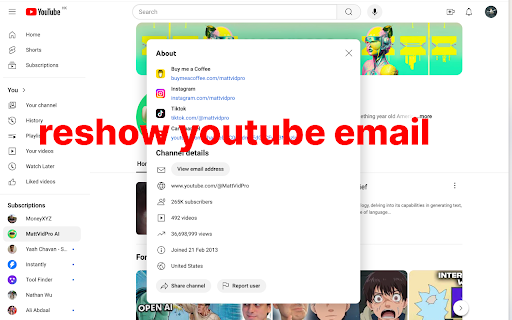
Show the hidden email address of the Youtube channel.
Show the hidden email address of the Youtube channel.
| 分类 | 🛠️工具 |
| 插件标识 | nlanbmlhpcnmemnnodfoiadhibdgfeln |
| 平台 | Chrome |
| 评分 |
★★★★☆
4.1
|
| 评分人数 | 127 |
| 插件主页 | https://chromewebstore.google.com/detail/show-youtube-email/nlanbmlhpcnmemnnodfoiadhibdgfeln |
| 版本号 | 1.0 |
| 大小 | 8.09KiB |
| 官网下载次数 | 117 |
| 下载地址 | |
| 更新时间 | 2024-07-13 00:00:00 |
CRX扩展文件安装方法
第1步: 打开Chrome浏览器的扩展程序
第2步:
在地址栏输入: chrome://extensions/
第3步: 开启右上角的【开发者模式】
第4步: 重启Chrome浏览器 (重要操作)
第5步: 重新打开扩展程序管理界面
第6步: 将下载的crx文件直接拖入页面完成安装
注意:请确保使用最新版本的Chrome浏览器
同类插件推荐
Show Youtube Email
Show the hidden email address of the Youtube chann

Twitch Hide Followed Channel
Twitch: hide a channel from the followed channels

YouTube channel location
Show info about the YouTube channel location(count
YouTube Playlist Duration
Popup to show the duration of the YouTube playlist