
My Bookshelf Chrome 插件, crx 扩展下载
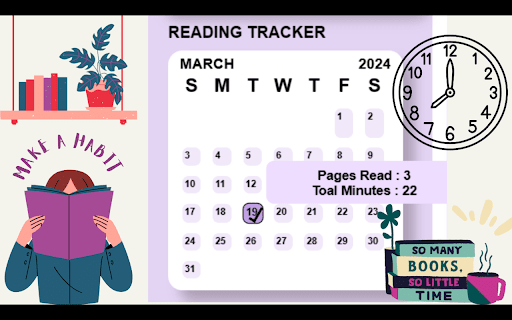


A digital bookshelf where users can easily store and organize all their books.
Digital Bookshelf Organization: Managing and finding books on a laptop can be cumbersome, so the idea is to create a digital bookshelf where users can easily store and organize all their books.
Quick Access to Current Book: Users can quickly find and resume reading their current book without distractions, allowing them to focus on their reading goals.
Automatic Reading Tracking: The platform automatically tracks users' reading habits, including time spent reading and pages read per day, helping users stay consistent with their reading goals.
Book Filtering and Search: Users can filter books based on categories or use search functionalities to find specific books in their library, enhancing overall organization and accessibility.
Reading Time Tracking: Users can track their reading time either by using a stopwatch or by setting predetermined reading intervals using techniques like the Pomodoro timer method.
Customized Reading Modes: The platform offers customizable reading modes such as scrolling or page-by-page reading, allowing users to tailor their reading experience based on preferences like viewing single or double-page layouts.
Note Taking and Learning Enrichment: Users can record all their notes and comments within the platform, leading to a more enriched learning experience and deeper engagement with the material.
| 分类 | 📚教育 |
| 插件标识 | nlgcpbjlneommiagacpkcdgihgjkiobc |
| 平台 | Chrome |
| 评分 |
★★★★★
5
|
| 评分人数 | 10 |
| 插件主页 | https://chromewebstore.google.com/detail/my-bookshelf/nlgcpbjlneommiagacpkcdgihgjkiobc |
| 版本号 | 1.2 |
| 大小 | 1.39MiB |
| 官网下载次数 | 91 |
| 下载地址 | |
| 更新时间 | 2024-04-10 00:00:00 |
CRX扩展文件安装方法
第1步: 打开Chrome浏览器的扩展程序
第2步:
在地址栏输入: chrome://extensions/
第3步: 开启右上角的【开发者模式】
第4步: 重启Chrome浏览器 (重要操作)
第5步: 重新打开扩展程序管理界面
第6步: 将下载的crx文件直接拖入页面完成安装
注意:请确保使用最新版本的Chrome浏览器
同类插件推荐

Paperlib Extension
Paperlib Chrome ExtensionThis is the Chrome extens

MultiPassword — Password manager
Secure password storage with the MultiPassword.com

Booksaver: Highlight to Save Books
Save books and book threads for later. Booksaver i

LC Predictor
Browser extension for predicting leetcode contest

Minimal Todo
Minimal Todo for your Daily ListMinimal Todo is a

Keep Problems
Save problem with link, name, difficulty, code and

Codeforces Enhancer
Makes Codeforces better: multiple ratings graph, c

Codeforces++
Codeforces extension packEver wanted Codeforces to
My Bookshelf
A digital bookshelf where users can easily store a

CF Analytics
Analyse Codeforces profilesCF Analytics Chrome ext
DailyPlanner
Start your productivity journey by achieve goals,

AI数学问题解决器 | AI for Math
试试AI数学问题解决器来简化你的数学。只需想象数学,并一步一步解决数学问题!遇到难题或文字题?AI数

Purrfect Pomodoro Timer: Productivity & Time Management
Purrfect Pomodoro TimerIntroducing the "Purrf