
IQDB Context Chrome 插件, crx 扩展下载
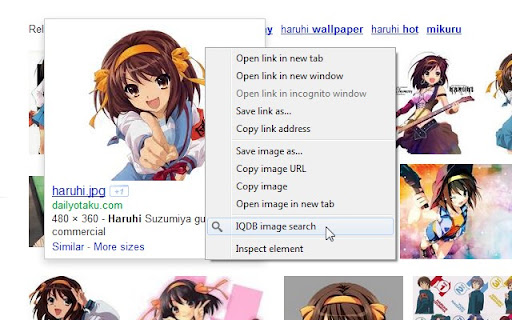
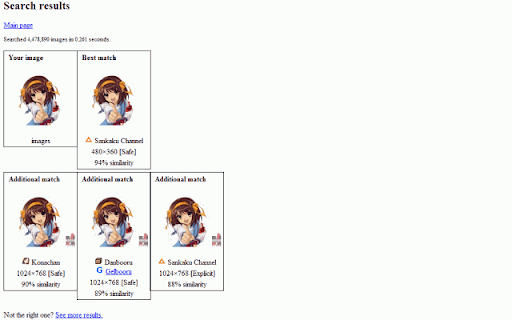
Right-click anime images to reverse-image-search for larger versions through IQDB.
Right-click on anime images to reverse-image-search for larger/similar versions through iqdb.org. Results open in a new background tab. (Can change settings to open in foreground.)
This is an unofficial extension; I am not related to IQDB.
***
Version History (changelog):
2.0:
- Updated to extension manifest v3. Minimum Chrome version increased to 88. If you need the previous version of the extension (0.6.1), it can be downloaded here:
https://drive.google.com/file/d/1A_LMEQG3obQSDRhAHn2ze5PjV7rkxi82/view?usp=sharing
- Settings code revised for manifest v3 compatibility. You may need to reapply your settings.
- Added option to always spawn the Results tab next to the current tab (enabled by default).
- Closing the Results tab now returns to the tab you searched from.
0.6.1:
- Changed tab-creation setting to use "active" instead of "selected", since the latter was deprecated after Chrome 33.
0.6:
- Now with HTTPS, thanks to the site admin adding support. Merry Christmas!
0.5:
- Changed from background page to event page, so the extension process is only loaded when needed.
- Minimum Chrome version increased to 22, due to above change.
- <all_urls> permission removed, since the contextMenu permission made it redundant at some point.
0.4:
- Updated to extension manifest v2, per Chrome requirements going forward.
- Minimum Chrome version increased to 18, due to above change.
- Removed defunct iqdb.hanyuu.net mirror from options.
0.3.1:
- Added 48x48 and 128x128 icons from the "Token" iconset by Evan Brooks (http://brsev.com), used under the Creative Commons attribution-noncommercial-share-alike 3.0 license.
- Added credits file.
0.3:
- Filenames with spaces and special characters should now work correctly.
- Added 48x48 icon.
0.2:
- Initial release.
| 分类 | 🛠️工具 |
| 插件标识 | nmahlbngglnabceabpgifacibgoogjcb |
| 平台 | Chrome |
| 评分 |
★★★★☆
4.9
|
| 评分人数 | 1106 |
| 插件主页 | https://chromewebstore.google.com/detail/iqdb-context/nmahlbngglnabceabpgifacibgoogjcb |
| 版本号 | 2.0 |
| 大小 | 17.56KiB |
| 官网下载次数 | 3000 |
| 下载地址 | |
| 更新时间 | 2021-10-19 00:00:00 |
CRX扩展文件安装方法
第1步: 打开Chrome浏览器的扩展程序
第2步:
在地址栏输入: chrome://extensions/
第3步: 开启右上角的【开发者模式】
第4步: 重启Chrome浏览器 (重要操作)
第5步: 重新打开扩展程序管理界面
第6步: 将下载的crx文件直接拖入页面完成安装
注意:请确保使用最新版本的Chrome浏览器
同类插件推荐

Pixiv Kurocore Plugin
pixiv.kurocore.com Pixiv Image Search pluginTools

SauceNAO Fetcher
Get's SauceNAO's results for an image.Quic

IQDB Context
Right-click anime images to reverse-image-search f

KanColle Command Center 改
Kantai Collection Game Viewer and HelperSuccessor

Pixiv Tool
A simple tool for downloading Pixiv illustrations

Koi Pixiv Extension
Make Pixiv Browsing BetterNow Properly Working Im

Lemon X
View/download Twitter images at original size. Sea

MAL it!
Search for your highlighted words on MyAnimeListA

Search Anime by Screenshot
Use anime screenshots to search the scene it is ta

4chan X
4chan X is a script that adds various features to
Pixiv 工具箱 Next
下载Pixiv,Fanbox、Comic上的动图、图片、漫画和小说等一些想说的... 6.0.0版本

Pixiv Downloader
You can download the images, comics and novels eas

Search image with Yandex
Search for similar images in Yandex with open sour