YouTube Watch Later Chrome 插件, crx 扩展下载
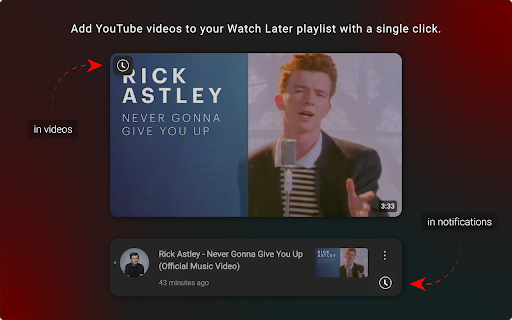
Add YouTube videos to your Watch Later playlist with a single click.
Have you ever browsed YouTube and used that "Add to Watch Later" button? Me too.
Are you annoyed when you want to use that button, but it is not there? Me too!
Would you love to always have such a button, so you can instantly add videos to your Watch Later playlist? ME TOO!
YouTube Watch Later is a small extension that adds an "Add to Watch Later" button to videos on various pages, and in the notification drawer. Simply install the extension, configure it to your likings inside the popup, and go add those videos to your Watch Later playlist!
---
The following general settings can be configured:
- "Mark notifications as read" allows for notifications to be marked as read when you add those videos to your Watch Later playlist.
- "Logging" allows the plugin to send logs to your console. Could be useful for debugging purposes.
The following button settings can be configured:
- "Opacity" allows you to set the opacity of the button to either "full" or "half".
- "Position" allows you to set the position of the button to either "top left" or "top right".
Please note that a page reload is required for the button settings to take effect.
---
This extension is open source! Links to the source code, and more detailed specifications, can be found on the website: https://youtube-watch-later.netlify.app.
| 分类 | 🎉趣味休闲 |
| 插件标识 | nmpfhocciajonacicdelpbhipglapgaa |
| 平台 | Chrome |
| 评分 |
★★★★☆
4.4
|
| 评分人数 | 426 |
| 插件主页 | https://chromewebstore.google.com/detail/youtube-watch-later/nmpfhocciajonacicdelpbhipglapgaa |
| 版本号 | 0.0.9 |
| 大小 | 129KiB |
| 官网下载次数 | 104 |
| 下载地址 | |
| 更新时间 | 2025-01-15 00:00:00 |
CRX扩展文件安装方法
第1步: 打开Chrome浏览器的扩展程序
第2步:
在地址栏输入: chrome://extensions/
第3步: 开启右上角的【开发者模式】
第4步: 重启Chrome浏览器 (重要操作)
第5步: 重新打开扩展程序管理界面
第6步: 将下载的crx文件直接拖入页面完成安装
注意:请确保使用最新版本的Chrome浏览器