
YouTube Deleted Videos: Track and Restore Chrome 插件, crx 扩展下载

Track, identify, restore, and find alternatives for deleted YouTube videos
Never lose a video again! Introducing our powerful Chrome extension designed specifically for YouTube users. Have you ever experienced the frustration of discovering that videos in your carefully curated playlist have been deleted? Don't worry, we have the solution!
Key Features:
- Automatically track and sync 1 playlist
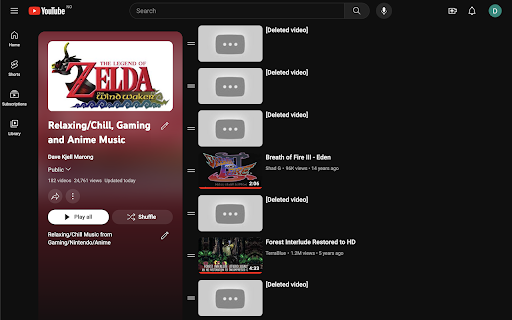
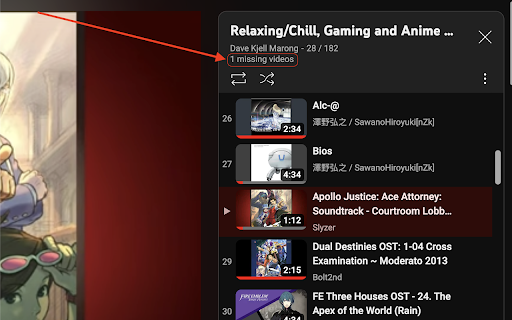
- Easily identify deleted videos
- Access up to 20 recent playlist backups for easy restoration
- Find alternative versions of deleted videos with a single click
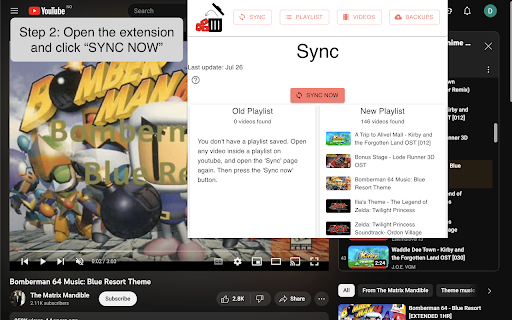
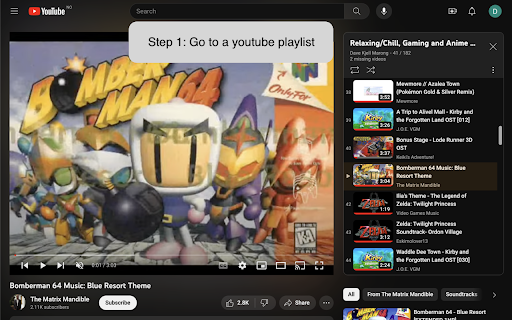
With our extension, effortlessly track and sync your favourite YouTube playlist. Simply save the playlist in our user-friendly interface, and the extension will automatically monitor it for any deleted videos. When a video is deleted, the extension saves the video title, allowing you to quickly identify the missing content.
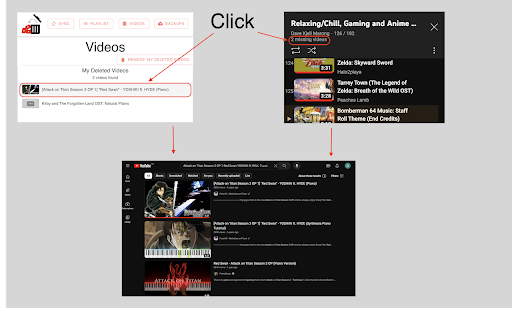
Here's the best part: When you click on a deleted video title, our extension opens a new tab in your browser, taking you directly to YouTube. In this new tab, the title of the deleted video has already been searched for, providing you with a convenient list of alternative versions and related results. No more wasting time searching for replacements!
Additionally, our app keeps track of your 20 most recent playlist updates, allowing you to restore previous versions effortlessly. Visit the "Backups" page/tab within the extension.
Don't let deleted videos disrupt your YouTube experience. Download our extension now and enjoy the peace of mind knowing that your playlist is always up to date!
PS: At this point, it's essential to note that the extension currently supports up to 200 videos for the playlist. However, a bigger capacity is possible in the future based on user feedback. Your input is invaluable as we work towards delivering an even more robust solution.
| 分类 | 🛠️工具 |
| 插件标识 | nnmnfooidppdikklofabhimjllemfgje |
| 平台 | Chrome |
| 评分 |
★★★☆☆
3.1
|
| 评分人数 | 17 |
| 插件主页 | https://chromewebstore.google.com/detail/youtube-deleted-videos-tr/nnmnfooidppdikklofabhimjllemfgje |
| 版本号 | 2.2.6 |
| 大小 | 168KiB |
| 官网下载次数 | 9000 |
| 下载地址 | |
| 更新时间 | 2024-01-18 00:00:00 |
CRX扩展文件安装方法
第1步: 打开Chrome浏览器的扩展程序
第2步:
在地址栏输入: chrome://extensions/
第3步: 开启右上角的【开发者模式】
第4步: 重启Chrome浏览器 (重要操作)
第5步: 重新打开扩展程序管理界面
第6步: 将下载的crx文件直接拖入页面完成安装
注意:请确保使用最新版本的Chrome浏览器
同类插件推荐

YouTube Deleted Videos: Track and Restore
Track, identify, restore, and find alternatives fo

Watched Videos On YouTube Remover
Remove completely watched videos from playlists on

Video Search for YouTube
Search the textual content of any YouTube video.Th

Playlists history
This extension generates change stories for YouTub

Where's My Video
One of the videos is missing from your Youtube pla

YouTube Playlist Deleted Tracker
Shows the titles of deleted YouTube videos.Saves t

Youtube Playlist Rescue
Archives YouTube playlists and checks for missing

为 YouTube™ 恢复注释
将注释支持带回 YouTube™!2019 年 1 月 15 日,YouTube 决定停止使用注释功

CustomTube - Restore the Old YouTube Layout
Choose your own YouTube layout, and more!What if y

Memento Time Travel
Travel to the past of the web by right-clicking pa

Time Machine
Obliterates the last fifteen minutes of your brows

Wayback Machine Playback Machine
Navigate from a given page to the Internet Archive

Wayback Machine
The Official Wayback Machine Extension - by the In