
Docs Hotkey Chrome 插件, crx 扩展下载
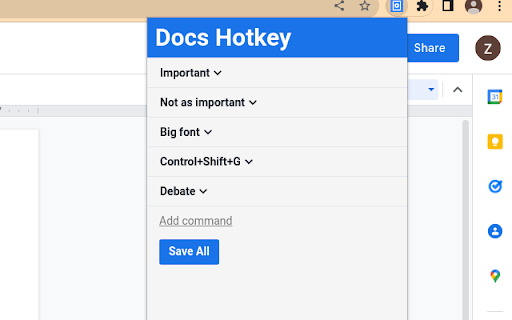
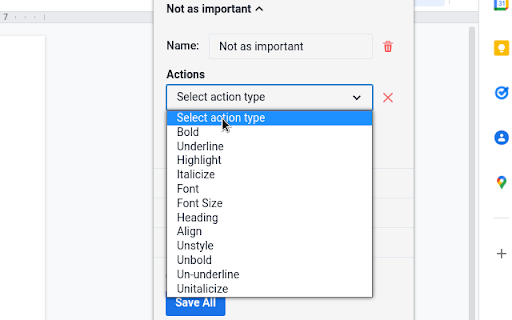

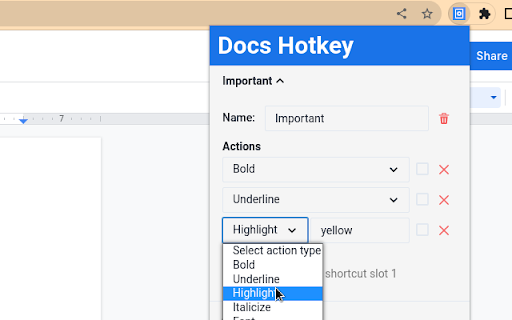
Create hotkeys for Google Docs
Docs Hotkey allows for complex hotkey setups with simple configuration. Hotkeys can be created to do the following:
- Highlight in any color
- Bold
- Underline
- Italicize
- Change text color
- Change fonts
- Change font size
- Set heading type (e.g., Heading 1, Normal Text, Title)
- Strike through text
- Change alignment and indentation
- Add emoji reactions
- Add bulleted lists and set their spacing
- Clear all styles and remove specific styles
- Execute add-ons
A single hotkey can be configured to do several of these at once.
Docs Hotkey was originally created solely for the addition of a highlight shortcut, but it has since expanded to many others. If you need a shortcut for something that is not available, feel free to contact me.
Now supports Google Slides and Google Classroom!
Documentation: https://docs-hotkey.zackmurry.com
| 分类 | 🛠️工具 |
| 插件标识 | npkpplmpfeaeemeecniaikpjjfbfefhh |
| 平台 | Chrome |
| 评分 |
★★★★☆
4.7
|
| 评分人数 | 9 |
| 插件主页 | https://chromewebstore.google.com/detail/docs-hotkey/npkpplmpfeaeemeecniaikpjjfbfefhh |
| 版本号 | 0.18 |
| 大小 | 790KiB |
| 官网下载次数 | 8000 |
| 下载地址 | |
| 更新时间 | 2025-01-07 00:00:00 |
CRX扩展文件安装方法
第1步: 打开Chrome浏览器的扩展程序
第2步:
在地址栏输入: chrome://extensions/
第3步: 开启右上角的【开发者模式】
第4步: 重启Chrome浏览器 (重要操作)
第5步: 重新打开扩展程序管理界面
第6步: 将下载的crx文件直接拖入页面完成安装
注意:请确保使用最新版本的Chrome浏览器
同类插件推荐

Default zoom for Google Workspace
Set the default zoom of your Google Workspace appl
Google Docs SplitView
Open and manage multiple Google Docs, Sheets, and

Focus for Google Docs
Focus for Google Docs helps you enter the writing
黑暗模式谷歌文档
使用我们的黑暗模式 Google 文档扩展提高效率。体验无缝 Google 文档黑暗模式,提高写作效

SheetKeys
SheetKeys adds powerful keyboard shortcuts to Goog

Docs Hotkey
Create hotkeys for Google DocsDocs Hotkey allows f

Spreadsheet Shortcuts
This extension is used to map keyboard shortcuts t

Keyboard Shortcuts
Set custom keyboard shortcuts for Chrome: View ext

Collage - Debate Card Cutter and Library
What separates a good debater from a great debater
cardr: the next-gen debate evidence collector
An advanced, next-gen evidence collector for debat

Debate Card Cutter
An extension to cut and format cards easilyDebate

Super Highlighter - 荧光标注工具
使用简单的右键单击和键盘快捷键高亮显示网页上的文本。自定义高亮颜色。在设备上保存选中的高亮文本。使用

Cite Creator
Constructs debate cites from html tags or page inf