
FACEIT Detailed CSGO Stats Chrome 插件, crx 扩展下载
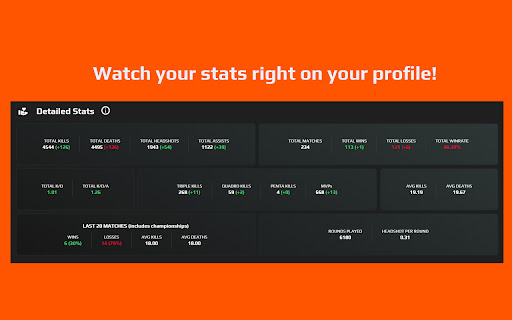
Displaying detailed CSGO stats based on data from FACEIT API
This extension allows you to watch your detailed FACEIT CSGO statistics.
Using this extension you can see not only your stats, but the opponent's stats too, so it'll be helpful to see who's playing against you.
Features:
- Detailed total data/scores, kills, deaths, kda, hsr, etc.
- Last 5 matches results display right with the global stats.
- Tracking last 20 matches results and shows its detailed stats.
- And more..
Note:
FACEIT Detailed CSGO Stats is developed independently, and is not officially endorsed by or affiliated with FACEIT.
Changelog:
v.1.2.3
main: Fixed stats wasn't loading when changing pages
---------------
v.1.2.1 (1.2.2)
main: Fixes due to faceit updates.
styles: enhanced 'loading' state, added spinner icon
---------------
v1.2.0
main:
- count info out of 7 matches instead of 5
- show wins/losses in 7 matches in 2nd block
- add percentage value of wins and losses to last 20 matches block
- add avg deaths and avg kills (total, 20 matches)
- add support link
styles:
- add borders to blocks
- add rounded corners to blocks
- change background gradient a bit
| 分类 | ♿无障碍访问 |
| 插件标识 | oaidnaliiemolmekjkbppenhmfjfgfbn |
| 平台 | Chrome |
| 评分 |
★★★★★
5
|
| 评分人数 | 3 |
| 插件主页 | https://chromewebstore.google.com/detail/faceit-detailed-csgo-stat/oaidnaliiemolmekjkbppenhmfjfgfbn |
| 版本号 | 1.2.3 |
| 大小 | 19.48KiB |
| 官网下载次数 | 4000 |
| 下载地址 | |
| 更新时间 | 2023-07-11 00:00:00 |
CRX扩展文件安装方法
第1步: 打开Chrome浏览器的扩展程序
第2步:
在地址栏输入: chrome://extensions/
第3步: 开启右上角的【开发者模式】
第4步: 重启Chrome浏览器 (重要操作)
第5步: 重新打开扩展程序管理界面
第6步: 将下载的crx文件直接拖入页面完成安装
注意:请确保使用最新版本的Chrome浏览器
同类插件推荐

Steamify - Faceit stats checker
Steamify is a Chrome extension that displays a use

FACEIT Predictor
Predicts the outcome of your FACEIT matches using

Faceit Stats by Eloking
Faceit Stats by Eloking is a Google Chrome extensi
FACEIT Mappio
See the opponent's map drop probability and ev

FACEIT Visuals
FACEIT Visuals helps the user for better experienc
FACEIT Detailed CSGO Stats
Displaying detailed CSGO stats based on data from

FACEIT HELPER
FACEIT user experience enhancement toolsUPDATE: 8/

FACEIT Lobby King Extension
Be one step ahead of your opponents. Use FACEIT lo

VisusGG
VisusGG, a browser extension by x3picF4ilx (Byteno

Repeek (formerly FACEIT Enhancer)
Repeek enhances your experience on FACEIT and adds