
refreshPowerBIV3 Chrome 插件, crx 扩展下载
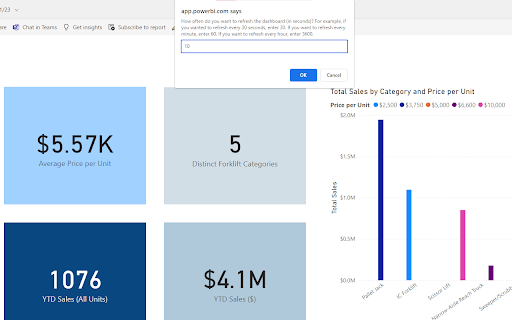
(V3) Actually refreshes Power BI dashboard every set interval (real)
Refreshes Power BI dashboard automatically.
- This works on any dashboard. Just make sure you don't put it in Power BI's full-screen mode. F11 is okay.
- User is allowed to set an interval of x seconds to refresh the dataset, after which a draggable element will show up, showing the last refresh time and the next refresh time.
- Can achieve refresh intervals that are <15 minutes. Useful if you are displaying a real-time dataset in Power BI.
- Does not automatically apply to dashboards. You have to click the extension icon to use it.
- If you reload the page, you have to click the extension icon and set the interval again.
| 分类 | 💻开发者工具 |
| 插件标识 | oebipbbekoiljkbkbfkebhkfeniaakik |
| 平台 | Chrome |
| 评分 |
★★★★★
5
|
| 评分人数 | 1 |
| 插件主页 | https://chromewebstore.google.com/detail/refreshpowerbiv3/oebipbbekoiljkbkbfkebhkfeniaakik |
| 版本号 | 5.0 |
| 大小 | 11.53KiB |
| 官网下载次数 | 53 |
| 下载地址 | |
| 更新时间 | 2024-12-05 00:00:00 |
CRX扩展文件安装方法
第1步: 打开Chrome浏览器的扩展程序
第2步:
在地址栏输入: chrome://extensions/
第3步: 开启右上角的【开发者模式】
第4步: 重启Chrome浏览器 (重要操作)
第5步: 重新打开扩展程序管理界面
第6步: 将下载的crx文件直接拖入页面完成安装
注意:请确保使用最新版本的Chrome浏览器
同类插件推荐

Designer
Customize any websiteEdit any website's text a

Youtube™ 的 Web 客户端 - SideYou
就像运行您最喜欢的移动应用程序一样,运行 Youtube™ 的网络客户端。This extensi
Full-screen Auto Refresh for PBIRS
Select interval and see your report in fullscreen

Power BI Slider
Display Power BI dashboards as slideshows on TVs a

Power BI Real-Time Slideshow
Display Power BI reports as refreshing, rotating s

Power BI Dashboard Refresh Pro
Refresh your Power BI Dashboard every 10 seconds w

Power BI Visuals Auto-Refresh
Automatically refreshes PowerBI visuals at user-de

Power BI RS Refresh
Automate the Refresh button click in Power BI Repo
refreshPowerBIV3
(V3) Actually refreshes Power BI dashboard every s

Power BI Navigator
Get more done in Power BIAn easier way to navigate

KidSecure
Safe browsing for Kids! Filters content in real ti

YouTube Comment Export
A export YouTube comment extension1. **Effortless
Passive Aggressive Email Translator Extension
Chrome extension that identifies and translates pa