
文本翻译 Chrome 插件, crx 扩展下载
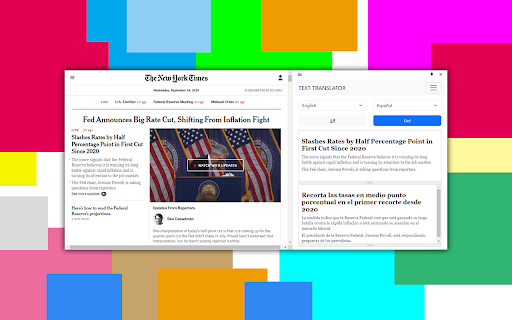
一个将文本翻译成任何语言的简单扩展。
This simple and user-friendly extension allows you to easily translate text into any language using reliable translation APIs. Whether it's a webpage, selected text, or manually entered text, this extension makes the translation process quick and efficient. It supports over 100 languages, including English, Spanish, Chinese, German, and many more.
Features:
- Support for manual text input for translation.
- Instant translations with the ability to select the target language.
- Customizable interface for selecting your favorite languages.
- Easy-to-use context menu for quick access.
- Automatic detection of the source language.
How to use:
- Install the extension via the web store.
- You can manually input text for translation via the extension icon in the browser toolbar.
- Select the target language and get your translation instantly.
| 分类 | 🛠️工具 |
| 插件标识 | ogogpebnagniggbnkbpjioobomdbmdcj |
| 平台 | Chrome |
| 评分 |
★★★★☆
4.4
|
| 评分人数 | 1978 |
| 插件主页 | https://chromewebstore.google.com/detail/文本翻译/ogogpebnagniggbnkbpjioobomdbmdcj |
| 版本号 | 1.0.1 |
| 大小 | 9.46MiB |
| 官网下载次数 | 46 |
| 下载地址 | |
| 更新时间 | 2024-09-23 00:00:00 |
CRX扩展文件安装方法
第1步: 打开Chrome浏览器的扩展程序
第2步:
在地址栏输入: chrome://extensions/
第3步: 开启右上角的【开发者模式】
第4步: 重启Chrome浏览器 (重要操作)
第5步: 重新打开扩展程序管理界面
第6步: 将下载的crx文件直接拖入页面完成安装
注意:请确保使用最新版本的Chrome浏览器
同类插件推荐
文本翻译
一个将文本翻译成任何语言的简单扩展。This simple and user-friendly ex

Human Reader, powered by ElevenLabs
Listen to any text in the web in a human voice. A

Tab Translate - 多功能翻译机
轻松将所选文本从一种语言翻译成另一种语言并提高您的语言技能。汇集了将语言翻译器用于商业和教育目的的最

The Easy Translator
The very easy in use translator.The Easy Translato