
Salesforce Easy Navigator Chrome 插件, crx 扩展下载
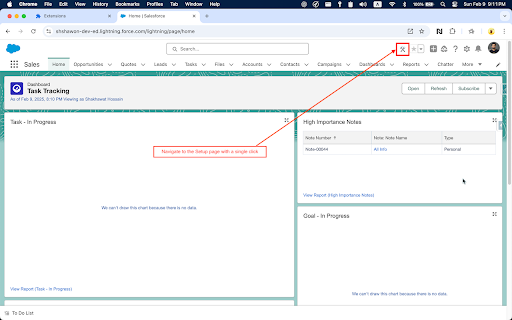
Salesforce Easy Navigator – One-Click Access to Your Most Used Pages!
Are you tired of going through multiple steps just to access the pages you need? This Chrome extension offers a one-click solution that saves you time every day, especially if you are a Salesforce professional.
Key Features:
=============
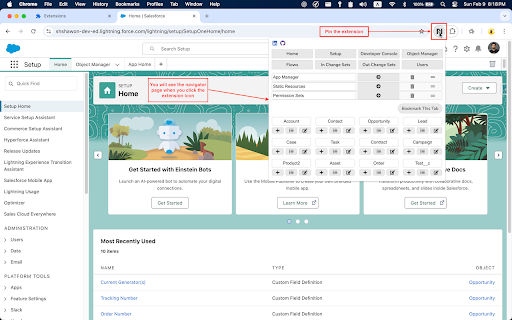
- 8 Fixed Links: Quickly access some common most visited pages.
- 10 Dynamic Bookmarks: Add any page to your bookmarks with just one click.
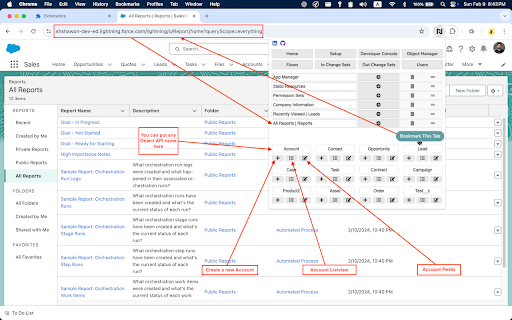
- Easy Object Navigation: Easily create records, navigate list views, and manage object settings for any standard and custom objects.
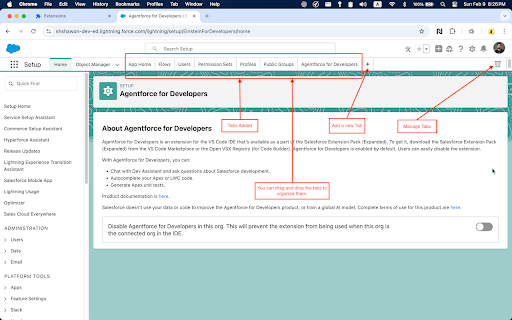
- Enhanced Setup Page: Add tabs dynamically next to the Object Manager to reduce the number of clicks to find pages.
- Added a Setup link that navigates to Setup with a single click.
Good to know
=============
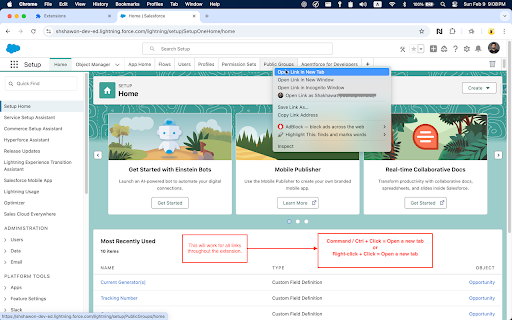
- If you click on the link, it will open on the same page. However, if you use Command / Ctrl + Click or Right-click + Click, it will open in a new tab or window, depending on your preference.
- You can drag and drop to organize tabs and bookmarks.
- The values will be stored in your Google Chrome storage, so no worries if you close your browser—the data will be saved all the time.
- I'm pretty sure you will love the UI. I made some extra effort to make it professional and consistent with Salesforce.
For any questions, please contact: [email protected]
| 分类 | 💻开发者工具 |
| 插件标识 | oiaghoidghokmelfojmlilhigihhmeba |
| 平台 | Chrome |
| 评分 |
★★★★☆
4.3
|
| 评分人数 | 88 |
| 插件主页 | https://chromewebstore.google.com/detail/salesforce-easy-navigator/oiaghoidghokmelfojmlilhigihhmeba |
| 版本号 | 2.6.1.0 |
| 大小 | 20.77KiB |
| 官网下载次数 | 330 |
| 下载地址 | |
| 更新时间 | 2025-02-13 00:00:00 |
CRX扩展文件安装方法
第1步: 打开Chrome浏览器的扩展程序
第2步:
在地址栏输入: chrome://extensions/
第3步: 开启右上角的【开发者模式】
第4步: 重启Chrome浏览器 (重要操作)
第5步: 重新打开扩展程序管理界面
第6步: 将下载的crx文件直接拖入页面完成安装
注意:请确保使用最新版本的Chrome浏览器
同类插件推荐
Salesforce Easy Navigator
Salesforce Easy Navigator – One-Click Access to Yo

Lightning Studio
Build Salesforce LWC development easy and fastest.

Salesforce Navigator for Lightning
Get more done in Salesforce - list and search reco

Salesforce Show Api Name
Display Field & Object API Names on Detail Pag

Salesforce Change Set Helper
Enhances the Salesforce change set. Adds last chan

Apex Debugger
Debug Salesforce apex code with easeApex debugging

ORGanizer for Salesforce
ORGanizer - The best Salesforce Extension everThe

Salesforce Colored Favicons
Updates the standard favicon on Salesforce tabs wi

Salesforce Mass Editor
Mass create, mass update, mass clone, mass delete

Salesforce Lightning Inspector
For inspecting Lightning appsThe Salesforce Lightn

Salesforce Logins by Synebo
Easy access to credential storageKEY FEATURES – B

Salesforce inspector
Productivity tools for Salesforce administrators a

Salesforce Inspector Reloaded
Productivity tools for Salesforce administrators a