RoValk - The Roblox Trading Addon Chrome 插件, crx 扩展下载
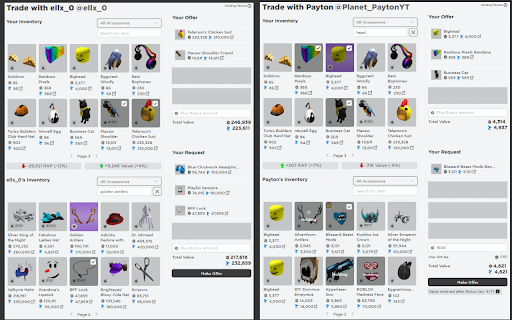

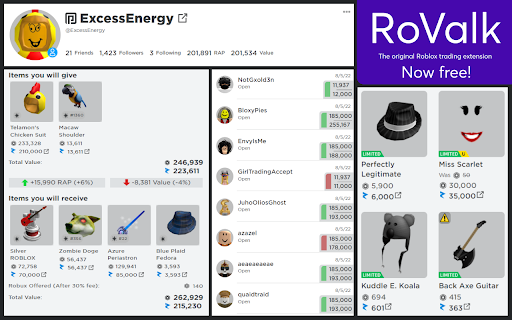
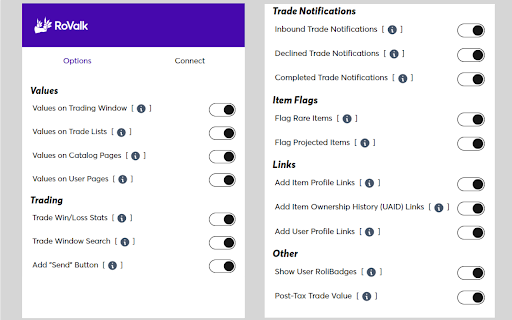
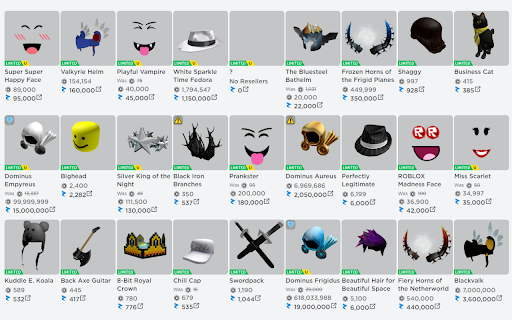
The ultimate companion for Roblox traders, with numerous tools to improve the efficiency and profitability of trading limited items.
RoValk is a free extension designed to improve the limited item trading experience on roblox.com.
RoValk's features include:
• Values on Trading Window - see Rolimon's item values and calculated totals displayed within your trading pages!
• Values on Trade Lists - preview trade values on the trade list before opening any trades!
• Item Flags - items will be flagged with certain icons to notify you when an item is projected or rare!
• Trade Notifications - be notified by a desktop push notification when you receive inbound trades, or when your trades are accepted or declined!
• Trade Window Search - automatically search for specific items in a user's inventory while sending a trade!
• Rolimon's Profile Links - links will be added to items and user pages that link to the corresponding page on Rolimon's!
• ??? ???? ???? ?????? ????????, with more being added with every update!
For a full list of features and their explanations, please visit our website:
https://rovalk.com/features
*Note that the Auto Trade Decliner no longer exists as a feature in the newest version, even though it still appears in the promotional video.*
What's New in Version 3.5 (1/8/2024):
• Values on Trade Lists now works for Outbound, Declined, and Completed trades as well as Inbound!
• Added new Show User RoliBadges feature!
• The Trade Notifier now works for Inbound, Outbound, and Completed trades, instead of just Inbounds!
• Updated much of the user interface to be more stylish!
• And more!
For more details on the update, see the update log on our website:
https://rovalk.com/updates
Join our Discord server and Roblox group:
• https://rovalk.com/discordjoin
• https://www.roblox.com/groups/15511376
RoValk is not affiliated with roblox.com or rolimons.com.
Developed by KDJ. Contact me: [email protected]
| 分类 | ♿无障碍访问 |
| 插件标识 | oifhhghkjjhnhonfghmdmkjbomnhblbf |
| 平台 | Chrome |
| 评分 |
★★★★☆
4.2
|
| 评分人数 | 5419 |
| 插件主页 | https://chromewebstore.google.com/detail/rovalk-the-roblox-trading/oifhhghkjjhnhonfghmdmkjbomnhblbf |
| 版本号 | 3.5.4 |
| 大小 | 568KiB |
| 官网下载次数 | 30000 |
| 下载地址 | |
| 更新时间 | 2024-12-07 00:00:00 |
CRX扩展文件安装方法
第1步: 打开Chrome浏览器的扩展程序
第2步:
在地址栏输入: chrome://extensions/
第3步: 开启右上角的【开发者模式】
第4步: 重启Chrome浏览器 (重要操作)
第5步: 重新打开扩展程序管理界面
第6步: 将下载的crx文件直接拖入页面完成安装
注意:请确保使用最新版本的Chrome浏览器