
Simple Element Remover Chrome 插件, crx 扩展下载


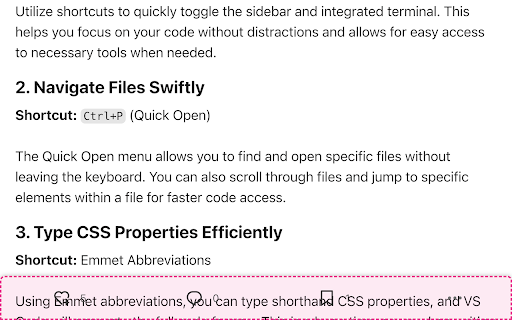
Remove elements from the page
Simple Element Remover is a Chrome extension that allows users to select and remove elements from a webpage. It's useful for removing unwanted content like tall, sticky navigation bars that cover the content when you zoom in on a page for better reading. Use it to declutter your browsing experience!
Features:
- Select elements to remove by clicking on them.
- Undo the last removed element by pressing Cmd+Z (macOS) or Ctrl+Z (Windows/Linux).
- Supports multiple languages: English, Portuguese, and Spanish.
How to Use:
1. Click on the Simple Element Remover icon in the Chrome toolbar.
2. Hover over elements to highlight them.
3. Click on an element to remove it.
4. Press Cmd+Z (macOS) or Ctrl+Z (Windows/Linux) to undo the last removal.
5. Press ESC to deactivate the extension.
Localization:
The following languages are supported:
- English
- Portuguese (Brazil)
- Spanish
| 分类 | 💻开发者工具 |
| 插件标识 | olhabochkiainlhboiajcjbjjpmnapkp |
| 平台 | Chrome |
| 评分 |
★★★★☆
4.2
|
| 评分人数 | 539 |
| 插件主页 | https://chromewebstore.google.com/detail/simple-element-remover/olhabochkiainlhboiajcjbjjpmnapkp |
| 版本号 | 1.0 |
| 大小 | 16.75KiB |
| 官网下载次数 | 43 |
| 下载地址 | |
| 更新时间 | 2024-06-13 00:00:00 |
CRX扩展文件安装方法
第1步: 打开Chrome浏览器的扩展程序
第2步:
在地址栏输入: chrome://extensions/
第3步: 开启右上角的【开发者模式】
第4步: 重启Chrome浏览器 (重要操作)
第5步: 重新打开扩展程序管理界面
第6步: 将下载的crx文件直接拖入页面完成安装
注意:请确保使用最新版本的Chrome浏览器
同类插件推荐
Simple Element Remover
Remove elements from the pageSimple Element Remove

YouTube Distraction Killer
Remove distracting elements from YouTube's lay

Snip - 删除网页元素
只需单击一下即可从任何网站删除任何元素With Snip you can remove any el

Content Edit & Blur
Easily edit, replace or blur elements on any webpa