
Split midjourney Images Chrome 插件, crx 扩展下载
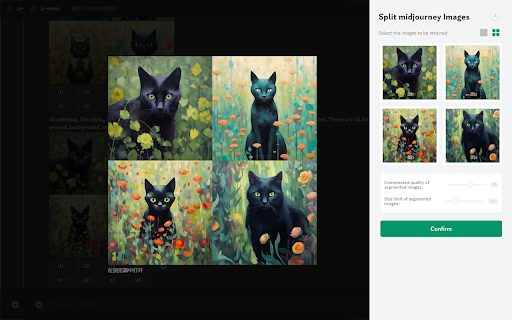
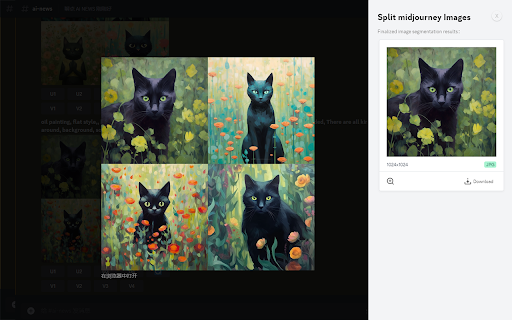
Right-click on any image within a webpage and effortlessly batch cut MidJourney's grid image (like a 4-by-4) into single images
Split a grid of images, such as a 4-by-4 grid generated by diffusion models like Midjourney or Stable Diffusion, into individual images effortlessly. Use the "Split midjourney Images" tool to easily split your Midjourney Grid into separate images with just one click. Download and save them directly to your computer hassle-free.
Features:
Right-click on any image within a webpage and effortlessly batch cut MidJourney's grid image.
Allow users to select the images they want to keep, allow users to set the size of the cropped images, and the image quality.
Note: Split midjourney Imagesis not affiliated with Midjourney.
Why develop this plugin:
By default, Midjourney generates images in a 4-grid format. However, if users wish to have them split into 4 individual images, they would typically need to manually perform the task or generate each image separately, which can be time-consuming and inconvenient for those seeking a quick image generation solution. To address this, we have developed the Image Cutter plugin. With a simple right-click on the image, users can access the 'Midjourney Image Cutter' option from the menu. This powerful tool automatically splits the 4-grid image into 4 distinct and high-quality individual images, eliminating any blurriness or loss of detail. This streamlined process allows users to effortlessly download and view each image separately, saving valuable time and ensuring a seamless user experience.
| 分类 | 🛠️工具 |
| 插件标识 | omkdkhiolmoenpgjfemapeeiamfhnbkc |
| 平台 | Chrome |
| 评分 |
★★★★☆
4.5
|
| 评分人数 | 58 |
| 插件主页 | https://chromewebstore.google.com/detail/split-midjourney-images/omkdkhiolmoenpgjfemapeeiamfhnbkc |
| 版本号 | 1.2 |
| 大小 | 57.49KiB |
| 官网下载次数 | 1000 |
| 下载地址 | |
| 更新时间 | 2024-02-07 00:00:00 |
CRX扩展文件安装方法
第1步: 打开Chrome浏览器的扩展程序
第2步:
在地址栏输入: chrome://extensions/
第3步: 开启右上角的【开发者模式】
第4步: 重启Chrome浏览器 (重要操作)
第5步: 重新打开扩展程序管理界面
第6步: 将下载的crx文件直接拖入页面完成安装
注意:请确保使用最新版本的Chrome浏览器
同类插件推荐

MJ - Manager
Extension to help you manage your Midjourney Image

MidPrompts · Your Midjourney Prompt Organizer
Your Style - Your Prompt!!!Free Version included.

Image Prompter - for Midjourney and more
An easier prompting tool for Midjourney,Stable Dif
Promptalot Helper
A Google Chrome extension that makes it easier to

Discord Midjourney 导出
批量下载 midjourney discord频道中的图片和提示词This is a very co

Split midjourney Images
Right-click on any image within a webpage and effo

Image Splitter
Plugin Introduction Image Splitter is a Chrome plu

Midjourney AutoPilot
Embark on a downloading quest, simply add a list o

Midjourney Prompt Helper - Prompt By ChatGPT
为AI绘图工具 Midjourney 服务的prompt生成助手,节省AI绘图创作者的学习成本,提高

Prompt2Notion
Just click to save the Prompt, Image, Author, etc.
PromptPal
The ultimate idea generator for your Midjourney ph

Midjourney Grid Splitter - Image Splitter
Split a grid of images (like a 4-by-4) generated b

MyPrompts
Easily save, manage, and share your artificial int