
Save As Image Converter Chrome 插件, crx 扩展下载
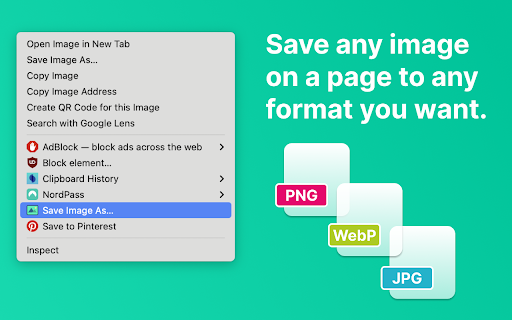
Save images in any format (PNG, JPG, WebP)
All -In-One download & convert images to and from any format, including Background Images!
? Key Features:
The extension offers a variety of conversion methods based on your specific needs:
✅ Now supports background images!
✅ Right-Click Convenience: Adds "Save image as..." to the right-click context menu.
✅ Enhanced compatibility: ensure your images work efficiently across all browsers and editors.
✅ Reverse Conversion.
✅ Quality Control: Set target quality for JPG files to create images with high quality or reduced file sizes.
✅ Boosted Productivity: Simplify png image conversion to enhance your workflow and improve the image quality.
↪️ All-Inclusive Conversion Options:
✅ Right-Click Conversion:
Right-click on any image. Select "Save image as..." from the context menu. The extension will help you convert and download the image to PNG, JPG or WebP
✅ Ensure Convert Images by Preserving Privacy:
Privacy matters, and we take it seriously! You will notice that all conversions happen locally on your computer when you upload the image ( without sending them to external servers).
✅ Broad Utility:
The extension isn't limited to one conversion type. You can use it to convert:
✓ webp to png
✓ jpg to png
✓ png to jpg
✓ jpeg to png
✓ png to jpeg
✅ Compatibility everywhere:
Make your pictures compatible with all browsers and image editors. Since it is universally compatible, you won't face the risk of dealing with unsupported formats. It helps to make your visuals accessible to a broad audience.
? Easy Right-Click Transformation:
There are several reasons to make the switch:
☑️ Lack of Wider Usage: PNG image format is a more universally recognized format than webp.
☑️ Upload and download your desired file type including png images, in a second.
☑️ Limited Tool Availability: Limited tools are available for working with webp files.
☑️ Lack of Browser Support: Not every browser is compatible with web images.
? How to Install
Here's how to install "Save As Image Converter" extension:
1️⃣ Click the "Add to Chrome" button (located on the right side above the text).
2️⃣ Confirm the installation by clicking "Add extension" in the pop-up.
3️⃣ Wait a few minutes for the extension to download and install.
4️⃣ That's all! Spot the icon in your Chrome toolbar.
| 分类 | 🛠️工具 |
| 插件标识 | pdadeigadaobnnoknpacdmoidalfbeno |
| 平台 | Chrome |
| 评分 |
★★★★☆
4.8
|
| 评分人数 | 104 |
| 插件主页 | https://chromewebstore.google.com/detail/save-as-image-converter/pdadeigadaobnnoknpacdmoidalfbeno |
| 版本号 | 1.50 |
| 大小 | 30.17KiB |
| 官网下载次数 | 348 |
| 下载地址 | |
| 更新时间 | 2025-02-05 00:00:00 |
CRX扩展文件安装方法
第1步: 打开Chrome浏览器的扩展程序
第2步:
在地址栏输入: chrome://extensions/
第3步: 开启右上角的【开发者模式】
第4步: 重启Chrome浏览器 (重要操作)
第5步: 重新打开扩展程序管理界面
第6步: 将下载的crx文件直接拖入页面完成安装
注意:请确保使用最新版本的Chrome浏览器
同类插件推荐
Save As Image Converter
Save images in any format (PNG, JPG, WebP)All -In-

MConverter - 文件转换器:AVIF、JXL、WebP
将 AVIF、WebP 保存为 JPG 或 PNG。转换网页中的图像、视频和音频。从视频创建动画 G

WEBP to PNG Converter
Converts images between WEBP, JPG, GIF, and PNG fo

Image Formatter: Save Image As Type
Image Formatter: Simplify Saving – PNG, JPG, WEBP