
YouTube Auto Subscribe Chrome 插件, crx 扩展下载
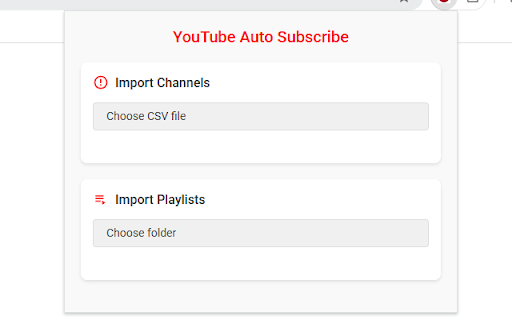
Automatically subscribes to YouTube channels from a backup CSV file
Easily Transfer Your YouTube Data
This Chrome extension helps you quickly move your YouTube subscriptions and playlists from one account to another using backup CSV files.
Features
- Transfer subscriptions
- Migrate playlists
How to Use
1. Backup Your Data
Use Google Takeout to export your YouTube data from your old account:
- Subscriptions list
- Playlists data
2. Transfer Data
For Subscriptions:
1. Open YouTube and log in to your new account
2. Click the extension icon
3. Select your subscriptions CSV file
4. Wait for the process to complete
For Playlists:
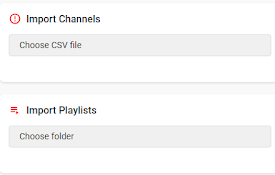
1. Click "Choose folder" in the Playlists section
2. Select the folder containing your playlist backup files (ending with `-videos.csv`)
3. Drink a coffee while the extension creates playlists and adds videos
4. You'll see a completion notification when done
Notes
1. Set YouTube's language to English or Chinese
2. Keep the browser open during the process
3. You can minimize the browser window but don't close it
Troubleshooting
1. Check the console for errors if something goes wrong
2. Make sure your CSV files are correctly formatted:
- Subscriptions: channels list from Google Takeout
- Playlists: files ending with `-videos.csv`
If you find this extension helpful, I'd be grateful for your star rating! ⭐️
Thank you for your support! ?
| 分类 | 🛠️工具 |
| 插件标识 | pgidfiofpgjbnfnjfplkloacifhfnomi |
| 平台 | Chrome |
| 评分 |
★★★★☆
4.6
|
| 评分人数 | 4544 |
| 插件主页 | https://chromewebstore.google.com/detail/youtube-auto-subscribe/pgidfiofpgjbnfnjfplkloacifhfnomi |
| 版本号 | 1.0.2 |
| 大小 | 439KiB |
| 官网下载次数 | 465 |
| 下载地址 | |
| 更新时间 | 2025-01-27 00:00:00 |
CRX扩展文件安装方法
第1步: 打开Chrome浏览器的扩展程序
第2步:
在地址栏输入: chrome://extensions/
第3步: 开启右上角的【开发者模式】
第4步: 重启Chrome浏览器 (重要操作)
第5步: 重新打开扩展程序管理界面
第6步: 将下载的crx文件直接拖入页面完成安装
注意:请确保使用最新版本的Chrome浏览器
同类插件推荐
YouTube Auto Subscribe
Automatically subscribes to YouTube channels from

Youtube Subscriptions Transfer
Transferring subscriptions from one YouTube accoun
Youtube Transcribe
一键获取YouTube视频的转录,使用YouTube 转录转换器轻松复制文本。ℹ️ 如何使用: 1

转录 YouTube
使用Transcript YouTube下载YouTube字幕。一键获取YT转录,轻松转录YouTu