
Cunny 翻译 Chrome 插件, crx 扩展下载
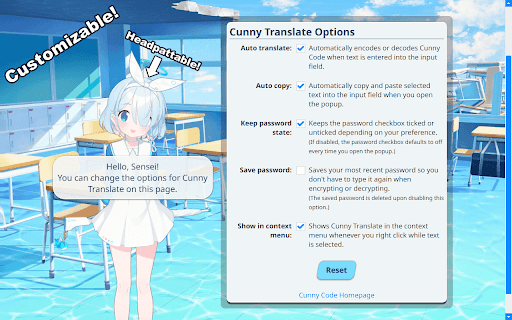
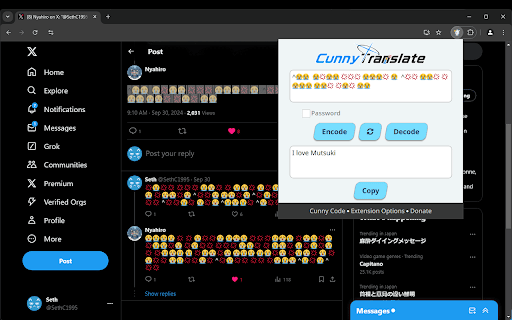
这款可爱又有趣的翻译器可让您在浏览网页时轻松翻译 Cunny Code。
Cunny Translate lets you easily translate to and from Cunny Code, a variation of Morse Code, while browsing the web.
Its functionality is fairly straightforward:
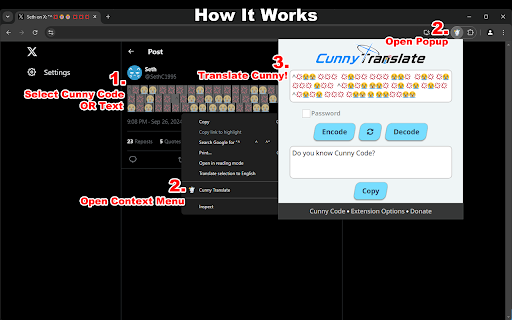
1. Select/highlight Cunny Code or regular texts with your cursor.
2. Click the extension icon or right click and choose "Cunny Translate" from the context menu.
3. The popup window for the extension should open and automatically translate Cunny Code to English and vice versa.
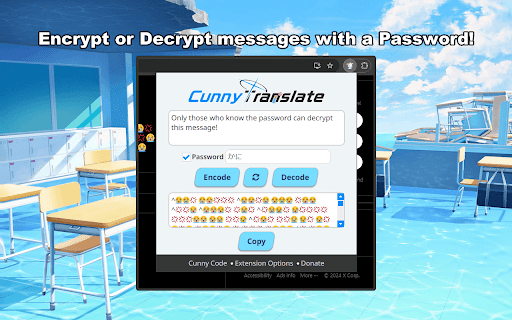
Cunny Translate also offers the ability to encrypt and decrypt messages with a password for those that want to keep their communications private.
Learn more about Cunny Code at https://sethclydesdale.github.io/cunny-code/code/
You can also contribute to the development of this extension on GitHub at https://github.com/SethClydesdale/cunny-translate
| 分类 | 💬沟通 |
| 插件标识 | phgoiaamiloblcdcfdihfgaklghcbmfe |
| 平台 | Chrome |
| 评分 |
★★★★★
5
|
| 评分人数 | 10 |
| 插件主页 | https://chromewebstore.google.com/detail/cunny-翻译/phgoiaamiloblcdcfdihfgaklghcbmfe |
| 版本号 | 1.1.1 |
| 大小 | 4.18MiB |
| 官网下载次数 | 131 |
| 下载地址 | |
| 更新时间 | 2024-10-20 00:00:00 |
CRX扩展文件安装方法
第1步: 打开Chrome浏览器的扩展程序
第2步:
在地址栏输入: chrome://extensions/
第3步: 开启右上角的【开发者模式】
第4步: 重启Chrome浏览器 (重要操作)
第5步: 重新打开扩展程序管理界面
第6步: 将下载的crx文件直接拖入页面完成安装
注意:请确保使用最新版本的Chrome浏览器
同类插件推荐

Spinf: AI Agent, Writing, Meeting, Voice Transcription
Enhance Chrome with AI autocomplete that understan

Camo AI
The most stealthy way to use AI in your browser.Ca

Add to.co - Capture prospects as you browse
The simplest way to capture contact details includ

Image to Text
Extract text from selected area on web pages or up

Blue Archive Cunny Checker
Shows a popup when a Blue Archive character is det

Mika Virus
Turn everything into Mika.Turn everything on googl

Cunny 翻译
这款可爱又有趣的翻译器可让您在浏览网页时轻松翻译 Cunny Code。Cunny Translat

Recruit A Tab
Blocks access to a site until you pull a 3-star st

Sechify Twitter
Invade Twitter images with a Blue Archive Sechi-dr

Sakurako Blue Archive Live Wallpaper
Immerse your Chrome tabs in a serene vibe with the

Sechify
Make every YouTube video into a Blue-Archive Sechi

Translate
Simple Inline Translate Tool.It's Dead Simple

Copy Copy
Copy and paste your clipboard history with URLs? C