
CSS Inspector Chrome 插件, crx 扩展下载
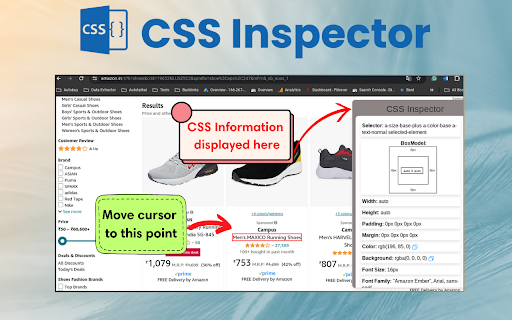
Activate this extension to view any information in a CSS-formatted pop-up with one click.
Ever wonder how websites get their snazzy looks? Installing the CSS Inspector Chrome Extension is like adding a decoder to your browser! Simply hover your mouse over any part of a webpage, and this extension will display a window showing the code that gives that part of the webpage its current look. Web design knowledge is no longer a mystery—CSS Inspector is designed to help you:
Understand the styling behind web elements.
Learn and improve your own web design skills.
Quickly identify and troubleshoot design issues.
With CSS Inspector, mastering web design is easier than ever!
Key Features of this chrome extension:
Effortless Inspection: Hover an element and click to inspect its CSS code easily.
Crystal Clear Display: If you are a current or future CSS employee, you can view CSS information in a clearly organized pop-up box.
Fast and Efficient: Simplify your project by not going through layers of code to find the necessary component.
How to Use:
Step 1: Install the Extension:
The extension used in this content is the CSS Inspector, and it can be obtained from the Chrome Web Store by searching for CSS Inspector then clicking the add to Chrome button.
Step 2: Activate Your Inspector:
To do this, the extension is now ready for action once it has been installed. Just click on the extension and point to any link, image or text on a webpage.
Step 3: Hover over the icons:
The preview of the styles will appear in a small window at the bottom right corner of the web page. This window also shows the CSS code of the element.
Step 4: Dive Deeper :
Move the mouse over the CSS code and click on the pop-up window to see the expanded view of the CSS code set and copy whatever you want.
Why it is Useful?
Unlock Web Design Secrets: Understand how the websites look like and get their appearance by analyzing the CSS code of the page.
Boost Your Design Skills: Web design is an important area of web development; it will help you get more information about it and thus make you a more informed designer or developer.
Save Time and Effort: Minimize the time spent on solving design problems or searching for CSS code snippets and get lost in the heaps of code.
To Whom Is It Useful?
CSS Inspector is designed for anyone who needs to understand and work with CSS on the Web – developers, designers, content authors, technical writers, testers, and others.
Web Developers: Take control of your development process by being able to instantly view and analyze any webpage’s CSS code.
Web Designers: Understand how other websites have been designed by viewing the CSS code that underlies the design of various websites.
Anyone Curious About Web Design: Discover the basics of web design and how the style of websites is defined by CSS.
FAQs
Q: Is CSS Inspector chrome extension is free to use?
A: Yes, CSS Inspector is a small and free extension for Google Chrome.
Q: Does CSS Inspector alter the webpage or is it just a tool that allows you to see how the webpage looks like with certain codes applied to it?
A: No, CSS Inspector is not a tool that you can edit with; it only shows the CSS code that is already applied. It doesn’t create any modifications to the webpage.
Q: What if I want to edit the CSS code?
A: Despite the fact that CSS Inspector doesn’t modify code, you can use all the displayed information to modify something in the Chrome DevTools environment.
Q: What disadvantages does CSS Inspector have?
A: The extension shows the code when you hover your cursor over the respective element. It may not display the styles that have been applied to the parent elements.
Q: I would like to know more about CSS, where can I go?
A: This tutorial is not the only source of information on CSS available on the Internet; there are various other sources such as tutorials and documentation.
| 分类 | 🛠️工具 |
| 插件标识 | pijbckgdmjhgniofdfgeajghedglddgm |
| 平台 | Chrome |
| 评分 |
★★★★★
5
|
| 评分人数 | 2 |
| 插件主页 | https://chromewebstore.google.com/detail/css-inspector/pijbckgdmjhgniofdfgeajghedglddgm |
| 版本号 | 1.0.1 |
| 大小 | 88.9KiB |
| 官网下载次数 | 288 |
| 下载地址 | |
| 更新时间 | 2024-07-03 00:00:00 |
CRX扩展文件安装方法
第1步: 打开Chrome浏览器的扩展程序
第2步:
在地址栏输入: chrome://extensions/
第3步: 开启右上角的【开发者模式】
第4步: 重启Chrome浏览器 (重要操作)
第5步: 重新打开扩展程序管理界面
第6步: 将下载的crx文件直接拖入页面完成安装
注意:请确保使用最新版本的Chrome浏览器
同类插件推荐

View CSS
A Chrome extension to view the CSS of any website.

CSS Magic Inspector
Edit CSS properties on the fly.Press the spacebar
CSS Inspector
Activate this extension to view any information in

CSS Inspector
The CSS Inspector extension outlines the elements
CSS Scanly - Copy CSS | Tailwind & Bootstrap
Copy CSS properties from any web element with CSS

cssPicker - copy css from website
copy html and css from any websiteCSSPicker ? - c
UI Inspector - Visual CSS Editor
Inspect and visually edit elements and their CSS d
适用于Google Chrome™的CSS Viewer
自由!快速简单的CSS属性查看器。是否想在网页上查看按钮/某些HTML元素的CSS? 安装此扩展程

Inspect CSS
The easiest way to inspect and edit CSSFeatures:
Quick Inspect Element
Quickly inspect HTML elements with a simple mouse

Hoverify: All-in-one extension for web developers
Master web development with an all-in-one browser

Visual CSS Editor
Customize any website visually.The extension allow

CSS Scan
快速检查复制CSS计算值此系统需支付得到许可才能使用它。您可以通过https://getcsssca