
Smart zoom Chrome 插件, crx 扩展下载
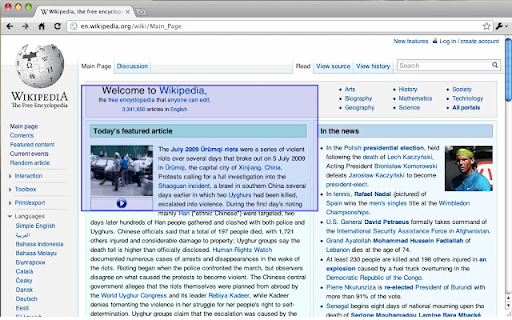
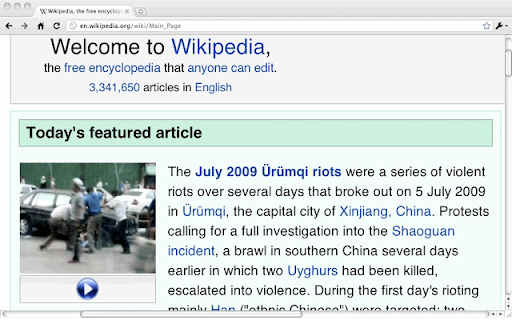
Right-click a column of text so zoom, or tap Shift and click, then press +/-/0 to adjust the font size. Esc unzooms.
Right-click a column of text and pick "Zoom" to make it take up the whole width of the screen just like double tap zooming of the mobile Safari. Esc unzooms.
Or you can tap Shift then click a column of text to zoom in on it, and/or press +/-/0 to adjust the font size. If you tap Shift accidentally, cancel zooming by tapping it again (or pressing any other key).
This extension works best for text-heavy sites: news, blogs, and so forth. It won't zoom all content correctly, and it's disabled for some sites like GMail and Hotmail where it doesn't work. Like all extensions, it's disabled on this site, too. And it's experimental: it could cause you problems.
If the keyboard shortcuts interfere with a webpage, you can disable them on a page by pressing ` (the backquote key, underneath Escape on some keyboards).
Note: This extension was originally developed by another author. I loved this extension but it was not maintained any more and it was not worked on recent version of chrome. So I decided to fix it for latest chrome. I really appreciate original authors' efforts.
origin: https://chrome.google.com/webstore/detail/smart-zoom/emfkpabfhchapdbfcmphhcagnkdloanp
| 分类 | ♿无障碍访问 |
| 插件标识 | ppinmodbpljedinjhhpabjcbgkfmkmak |
| 平台 | Chrome |
| 评分 |
★★★★★
5
|
| 评分人数 | 6 |
| 插件主页 | https://chromewebstore.google.com/detail/smart-zoom/ppinmodbpljedinjhhpabjcbgkfmkmak |
| 版本号 | 0.1.7.3 |
| 大小 | 30.24KiB |
| 官网下载次数 | 1000 |
| 下载地址 | |
| 更新时间 | 2024-05-20 00:00:00 |
CRX扩展文件安装方法
第1步: 打开Chrome浏览器的扩展程序
第2步:
在地址栏输入: chrome://extensions/
第3步: 开启右上角的【开发者模式】
第4步: 重启Chrome浏览器 (重要操作)
第5步: 重新打开扩展程序管理界面
第6步: 将下载的crx文件直接拖入页面完成安装
注意:请确保使用最新版本的Chrome浏览器
同类插件推荐

ZoomEd
Zoom in on any part of a webpage.ZoomEd by Mr. Te

Custom Page Zoom
Easily set a custom zoom level for each website (o

Text Zoom to increase font sizes
Extension for modifying the font size without chan

Auto Zoom from Width
Zoom to fit the screen width.How to operate ・Click

Google Chrome™的放大镜
自由!放大镜在网页上显示缩放的图像,使所选区域详细可见。此放大镜扩展名显示了放大镜半径内的放大区域,

Image zoom and drag
Image zoom and dragHow to use - Right-click on th

FitWidth
Adds an additional zoom mode for the default image

Zoomba
Customizable zoom increment.Zoomba is an extension

Granny Zoom
Zoom zoomAdds a large menu for zooming in.
Smart zoom
Right-click a column of text so zoom, or tap Shift

Zoom on doubleclick
Zooming in on websites. Doubleclick on any element
Ctrl Zoom
Ctrl + touchpad scroll to zoomThis extension adds

Scroll Zoom
Zoom web pages with the left or right mouse button