
Live Caption Analytics Chrome 插件, crx 扩展下载
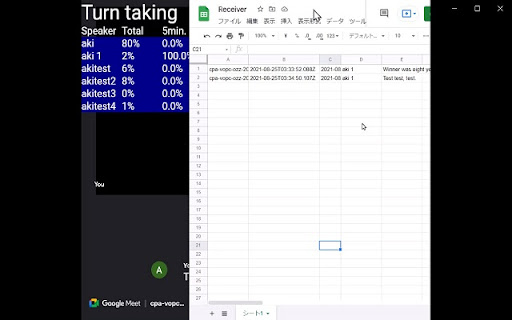

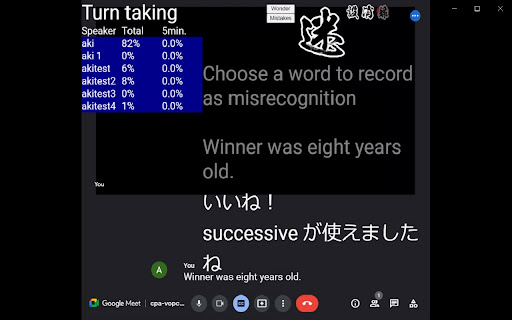
Provide routes to send live captions to analytics servers.
This extension sends live captions to your designated servers to perform analytics and to store in a separate spreadsheet. The server can return the calculated results back to this extesion which renders the response to the screen.
Upon configuration of server destination address of your choice and explicit activation of the feature, the extension will tentatively (from v1.0.2 on) start sending captions in Google Meet and Zoom, (v1.0.3) transfer captions from the Chrome browser built-in Speech recognition in the same way as the other conferencing tools covered in this extension, and (v1.0.4) authenticate you through Google account to restrict access to the stored caption on the analytics server if implemented so.
The version, v1.0.4.1, allows you to choose to caption non-English language through browser speech recognion using Web Speech API, and indicates security risks though option dialog and its associated explanation available on the extension web site.
The latest version, v1.0.4.3, includes new features that gives the option to move around screen elements, fixes further unexpected behavior to send captions with the same time stamp, and provide the mechanism to allow other users to join the same session through token and emails. The version, v1.0.4.2, is a fix to locate Google Meet transcription area, which had been failing to identify the area. The version, v1.0.4.4, has a few of minor user interface corrections that protect the common UI element areas in online tools and keep users from placing LCA elements over the buttons of online tools. The version v1.0.4.5 has removed the URL restriction in Google Meet under which the URL has to end with hl=en to determine the interface language. V1.0.4.6 delivers a quick fix for unintended behavior that had hidden feedback from LCA when the user turns on recording.
V1.0.4.7 allows the extension to store an OpenAI API Key in variable, not in disk.
Sample code work in progress for the analytics is available on GitHub.
| 分类 | 📝工作流程与规划 |
| 插件标识 | pppkdkcchlonlocoiejjinmkdncfblji |
| 平台 | Chrome |
| 评分 |
★★★★☆
4.3
|
| 评分人数 | 2807 |
| 插件主页 | https://chromewebstore.google.com/detail/live-caption-analytics/pppkdkcchlonlocoiejjinmkdncfblji |
| 版本号 | 1.0.4.8 |
| 大小 | 78.1KiB |
| 官网下载次数 | 757 |
| 下载地址 | |
| 更新时间 | 2025-01-08 00:00:00 |
CRX扩展文件安装方法
第1步: 打开Chrome浏览器的扩展程序
第2步:
在地址栏输入: chrome://extensions/
第3步: 开启右上角的【开发者模式】
第4步: 重启Chrome浏览器 (重要操作)
第5步: 重新打开扩展程序管理界面
第6步: 将下载的crx文件直接拖入页面完成安装
注意:请确保使用最新版本的Chrome浏览器
同类插件推荐
Vi Subtitle: Add Live Captions to Any Webpage
Vi Subtitle - Add Live Captions for your watching

MS Teams Live Captions Saver.
This extension allows you to capture and save MS T
Live Caption Analytics
Provide routes to send live captions to analytics

CaptionSpeaker
CaptionSpeaker是chrome扩展程序,可让您通过说出youtube上设置的字幕来收听指

iTour Video Translation
This extension translates video's audio on the

Caption.Ed
Realtime video transcriptionProvides a live, on-sc

Substital: Add subtitles to videos and movies
Add captions to any video or movie on Netflix, You

Textify
Live stream speech-to-text captions between users

closed caption - 双字幕机
用于查看另一种语言字幕和现有字幕的扩展功能只需一次点击,就能在现有字幕旁观看你喜欢的语言的字幕 ?
Live caption with translation (ChatGPT)
Live audio/video streaming caption with translatio
SubTrans - 通用字幕翻译套件
多个站点的通用字幕翻译器。显示双语字幕。支持的站点正在积极增加。? SubTrans 是一个通用的字

Live Captions
Multi-Language Captions and Transcription for Pres

YouTube™ 双字幕
YouTube 双语字幕,同时显示两种语言字幕,支持自定义样式。YouTube 双语字幕,同时显示两