AutoPlay and Media Control Chrome 插件, crx 扩展下载
CRX扩展文件安装方法
第1步: 打开Chrome浏览器的扩展程序
第2步:
在地址栏输入: chrome://extensions/
第3步: 开启右上角的【开发者模式】
第4步: 重启Chrome浏览器 (重要操作)
第5步: 重新打开扩展程序管理界面
第6步: 将下载的crx文件直接拖入页面完成安装
注意:请确保使用最新版本的Chrome浏览器
同类插件推荐

Mute Autoplay Videos
Mutes all HTML5 videos when opening a webpage. No

Dark Mode Master
A Dark theme for any website. Dark Mode Master is

Go Away! Autoplay
A chrome extension created to automatically mute w

Distraction free: Hide YouTube content
Hide the YouTube content and be distraction free!E

Disable HTML5 Autoplay (M3)
Disables HTML5 autoplay of videos and audios. This

Youtube Playlist Autoplay Stopper
Can Disable/Enable autoplaying the next video in q

Auto Play
Automatically play music from a variety of website
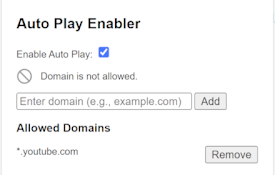
Auto Play Enabler
This extension is no longer updated. Please try th

AutoPlay and Media Control
Control video/audio playback with just a click, wo

Dark Mode - Dark Reader extension for Chrome
Dark Mode a dark theme for every website. Switch a

Yet another autoplay blocker
Pause videos until you click on them.Block autopla

Noplay
Video autoplay blocked for goodTired of videos pla

Disable HTML5 Autoplay & Version 2024
Disables autoplay of all HTML5 audio and video on