User Presence for MS Teams Web Client Chrome 插件, crx 扩展下载
CRX扩展文件安装方法
第1步: 打开Chrome浏览器的扩展程序
第2步:
在地址栏输入: chrome://extensions/
第3步: 开启右上角的【开发者模式】
第4步: 重启Chrome浏览器 (重要操作)
第5步: 重新打开扩展程序管理界面
第6步: 将下载的crx文件直接拖入页面完成安装
注意:请确保使用最新版本的Chrome浏览器
同类插件推荐

Email Taskbar/Dock Unread Badge
Add an unread email count badge to Outlook's**

Badge Notifications for Outlook PWA
A tool to add a pending notification app badge (te

MS Teams: Always Available
A tool for MS teams.Keep your Microsoft Teams stat

Wiggle Teams
Ensures your Microsoft Teams status stays active b

Close Microsoft Teams tabs
Automatically close Microsoft Teams tabs.This exte
Teams Always Available
Keeps you on Teams always AvailableChrome extensio

Force Microsoft Teams in Browser
Force Microsoft Teams to open meeting links in the

keep-teams-online
keep teams and slack onlineKeep TEAMS / SLACK alwa

Microsoft Teams Reply
A Chrome extension adding the reply feature to the
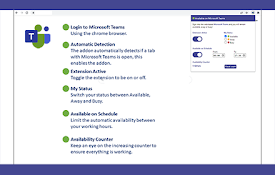
Available on Teams
Remain Available on Microsoft TeamsThis extension

User Presence for MS Teams Web Client
A tool to keep you available based on system idle

Better Teams
Better Teams. Improved MS Teams Experience.Better

Resize Outlook Tool
Allows you to fully resize the non-preview panes o