右键查看图片/视频详细信息 Chrome 插件, crx 扩展下载
CRX扩展文件安装方法
第1步: 打开Chrome浏览器的扩展程序
第2步:
在地址栏输入: chrome://extensions/
第3步: 开启右上角的【开发者模式】
第4步: 重启Chrome浏览器 (重要操作)
第5步: 重新打开扩展程序管理界面
第6步: 将下载的crx文件直接拖入页面完成安装
注意:请确保使用最新版本的Chrome浏览器
同类插件推荐

将 WebP 转换为 JPG(免费)
使用这个免费的将 WebP 转换为 JPG(免费)转换器,只需一键即可快速将 WebP 转换为 JP

Enable Right Click – 启用右键点击
启用右键点击受限网站。启用右键单击是一个简单有效的浏览器扩展程序,旨在帮助您重新获得对右键单击和文本

MS Edge TTS (Text to Speech)
MsEdge TTS Extension (Text to Speech)✨ NEW FEATURE

Right Clicking - Views Image
Adds an option to 'View image' to the righ

Fullscreen Image
View any image in fullscreen mode by right-clickin

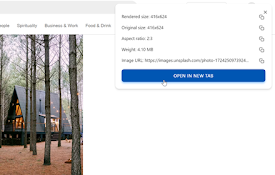
右键查看图片/视频详细信息
右键菜单快速查看图片和视频的尺寸、大小等信息这是一个简单而强大的浏览器扩展,让您能够轻松查看网页上的

Video Roll - 多合一的网页视频百宝箱
一个提升你网页视频观看体验的百宝箱,具备旋转、缩放、倍速、浮动窗口播放、截图、关灯专注、循环播放、突
Get Image Info
The extension displays the webpage image informati

Image info
Display image info: width, height, sizeShow image

Video Filters
Easy access to html5 video filtersExtension enable

TooSlow? - Load Websites Faster
Browse websites faster and smoother with advance c

Pic info
Gives a detailed info about the image like URL, al

Image info
Select any image on a page, including background i