Bring back Google search result counter and display indexed pages Chrome 插件, crx 扩展下载
CRX扩展文件安装方法
第1步: 打开Chrome浏览器的扩展程序
第2步:
在地址栏输入: chrome://extensions/
第3步: 开启右上角的【开发者模式】
第4步: 重启Chrome浏览器 (重要操作)
第5步: 重新打开扩展程序管理界面
第6步: 将下载的crx文件直接拖入页面完成安装
注意:请确保使用最新版本的Chrome浏览器
同类插件推荐

Google SERP Position
Displays a number next to each Google search resul

Show SERP Count - Restore Google Search Result Count
'Show SERP Count' is a Chrome extension th

Google Result Counter
Automatically counts your Google search results an

Google Search Results Display Enhancer
Display the number of Google search results, and s

显示 Google 搜索结果数量
显示谷歌页面上默认隐藏的搜索结果总数。Google 搜索增强器 默认显示 Google 搜索结果数

Show number of results and indexed pages on Google SERP (for SEO)
This free Google Chrome extension shows the number

Centuple
Display 100 Google search results on one pageCentu
Show 100 Google Search Results
With this extension, you can view up to 100 search
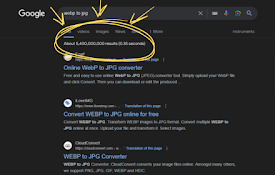
Bring back Google search result counter and display indexed pages
This free Google Chrome extension brings back the

Google Search 100 Results
Appends '&num=100' to the current Goog

Google 100 Results: Now you can have this again in google search settings!
Get Google 100 Results - Now you are able to see 1

Search Enhancer for Google™
Enhance Google™ search with infinite scroll, serve

MST SERP Counter - SEO Free SERP Checker Tool
SERP Counter gives accurate search result of searc