AWS SSO Colourise Chrome 插件, crx 扩展下载
CRX扩展文件安装方法
第1步: 打开Chrome浏览器的扩展程序
第2步:
在地址栏输入: chrome://extensions/
第3步: 开启右上角的【开发者模式】
第4步: 重启Chrome浏览器 (重要操作)
第5步: 重新打开扩展程序管理界面
第6步: 将下载的crx文件直接拖入页面完成安装
注意:请确保使用最新版本的Chrome浏览器
同类插件推荐

Status of Github
This extension shows an icon for the current statu

AWS Console Title Bar
Add Additional information to the AWS title bar.AW

AWS Account Identifier
Adds a description with a specific color to the AW

AWS SSO Account Highlight
Display a badge of current AWS Account NameShowing

AWS Account Helper
Shows an extra header to identify the current AWS

Rainbow AWS: AWS console header color
Change the color of the AWS console's headers

AWS Console Labels
Displays AWS Account Labels in the AWS Console hea

pile
pilepile is a material design-ish chrome extension

TIO Syntax Highlighter
Syntax highlighter for Try It Online (https://tio.
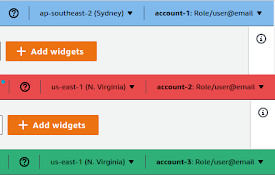
AWS SSO Colourise
Change the AWS navbar colour based on account (and

AWS SSO Auto-Expand Accounts
Tired of clicking to expand an AWS SSO account to

Magento 2 images replace tool
Magento 2 tool to reload images from alternative d

GitHub to CircleCI
Open your CircleCI pipelines directly from a GitHu