
Fyle - Expense Management Chrome 插件, crx 扩展下载
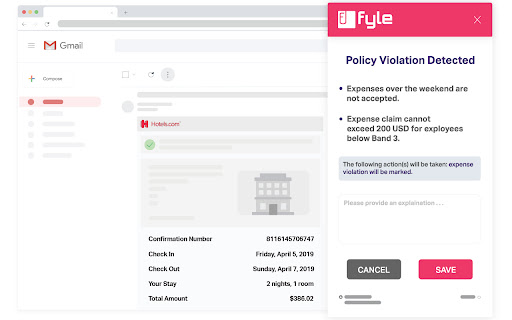

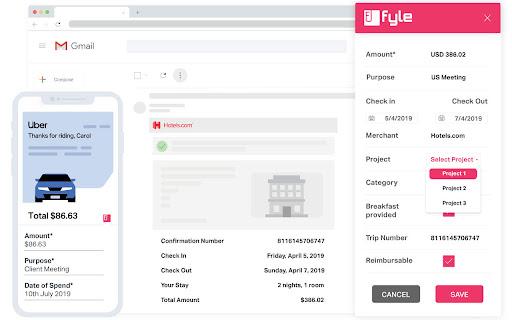
Eliminate your expense management woes with Fyle. World's 1st Chrome extension that helps you track and manage expenses from Gmail.
Fyle aims to automate the cumbersome expense tracking process by making AI do the work for you. Flight tickets, travel reservations, cabs, food bills, shopping bills - Fyle extracts all the relevant information with just a single click automatically from your inbox.
The world’s first AI driven expense management platform, Fyle automatically extracts data from receipts, attaches the invoice, ensures it is compliant with company policies without any manual effort.
How does the Fyle Chrome extension work?
• Extracts data from the receipt to the expense form with a single click
• Clubs the expense invoice directly with the expense form
• Automatically checks against active company policies before submitting it for approval
• Instantly reconciles the receipt with existing corporate card transactions
What are some other ways employees can track expenses with Fyle?
• Scan and upload receipts in an instant with InstaFyle
• Using BulkFyle, you can upload upto 20 receipts simultaneously to create expense reports separately with ease
• More than one way to track and record your expenses using your favourite apps - WhatsApp, Slack, G Suite, Office 365 and many more!
What more does Fyle do?
Finance teams can ensure compliance driven employee expense management experience. Here’s how:
• Helps automate any expense approval workflow
• Ensure quick reimbursements of employee expenses directly through Fyle using ACH
• Advanced analytics that will help you keep track of company expenses and make informed decisions
• Manage multiple corporate cards and easily reconcile all expenses - all under one single dashboard
• Custom integrations with leading accounting and ERP software
• Continuously audit ready to close books on time efficiently and effectively
All of this and more with enterprise grade-security and best-in-class 24/7 customer support.
If you have any problem or query regarding Fyle, please drop us an email at [email protected]
| 分类 | 📝工作流程与规划 |
| 插件标识 | abggpefphmldapcoknbcaadbpdjjmjgk |
| 平台 | Chrome |
| 评分 |
★★★★☆
4.3
|
| 评分人数 | 101 |
| 插件主页 | https://chromewebstore.google.com/detail/fyle-expense-management/abggpefphmldapcoknbcaadbpdjjmjgk |
| 版本号 | 3.0.0 |
| 大小 | 717KiB |
| 官网下载次数 | 4000 |
| 下载地址 | |
| 更新时间 | 2024-04-26 00:00:00 |
CRX扩展文件安装方法
第1步: 打开Chrome浏览器的扩展程序
第2步:
在地址栏输入: chrome://extensions/
第3步: 开启右上角的【开发者模式】
第4步: 重启Chrome浏览器 (重要操作)
第5步: 重新打开扩展程序管理界面
第6步: 将下载的crx文件直接拖入页面完成安装
注意:请确保使用最新版本的Chrome浏览器
同类插件推荐

FanSided News
News reader companion for FanSided NetworkFanSided

BudgetTracker
Manage your money to get out and stay out of debtB

Zoho Expense
Snap screenshots of online receipts and automatica

Budget Manager
This extension tracks your overall spendings.Calcu

Fyle - Expense Management
Eliminate your expense management woes with Fyle.

Expense Tracker
This extension tracks your overall expenses online

Free Accounting Software by SlickPie
Easy-to-use accounting and invoicing software for

Workspace Launcher
Quickly Launch Custom WorkspacesWorkspace Launcher

RightTasks for Gmail™
Improved task management in Gmail™See your tasks a

Form+
Form+ is a simple, friendly form builder that allo

DragApp: Gmail 中的共享收件箱
将 Gmail 转变为协作工具,供团队通过 Gmail 管理共享收件箱、服务台、CRM、任务管理等。

Sortd for Gmail
All-in-one Sales, Service, Help Desk & Task Ma

Hey Habit
Replaces the new tab page with a personal dashboar