
YouTube Speed Controller - Video Playback Control Chrome 插件, crx 扩展下载

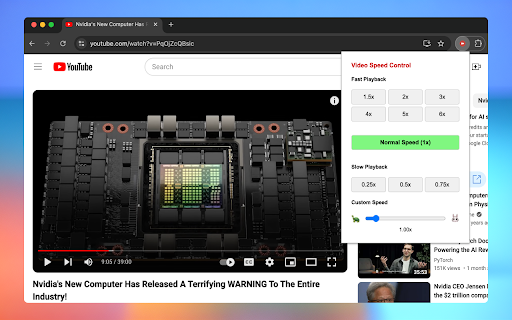
The Ultimate Speed Controller for YouTube, Netflix, Bilibili & ALL Videos
? The Ultimate YouTube Speed Controller - Supercharge Your Video Experience! ?
Take full control of YouTube playback speeds and ALL video content! Perfect for tutorials, lectures, and entertainment. ?⏩⏪
Whether you're watching YouTube videos, Bilibili content, or any HTML5 video, our speed controller gives you the power to control time itself! ⏰✨
? Key Features:
• ?️ One-Click Speed Presets (0.25x to 6x): Instantly change YouTube playback speed!
• ? Unique "Turtle-to-Rabbit" Speed Slider: Fine-tune your viewing pace!
• ⚡ Quick Speed Toggle: Instantly return to normal speed!
• ? Works Everywhere: YouTube, Bilibili, Netflix, and ALL video sites!
Perfect for:
? Students watching lectures
? Developers following tutorials
? Online learning
⏱️ Busy professionals
? Language learners
From lightning-fast 6x for skimming content to detailed 0.25x for analysis, our YouTube Speed Controller adapts to your needs! Save time and boost productivity! ?
No ads, no bloat - just pure speed control for YouTube and ALL video platforms! ⚡
#1 Choice for YouTube Speed Control - Download Now! ?
| 分类 | 🛠️工具 |
| 插件标识 | agjefnbflphfpnfidakhecmfehlpgomd |
| 平台 | Chrome |
| 评分 |
★★★★☆
4.6
|
| 评分人数 | 3880 |
| 插件主页 | https://chromewebstore.google.com/detail/youtube-speed-controller/agjefnbflphfpnfidakhecmfehlpgomd |
| 版本号 | 1.0.1 |
| 大小 | 13.6KiB |
| 官网下载次数 | 69 |
| 下载地址 | |
| 更新时间 | 2024-11-30 00:00:00 |
CRX扩展文件安装方法
第1步: 打开Chrome浏览器的扩展程序
第2步:
在地址栏输入: chrome://extensions/
第3步: 开启右上角的【开发者模式】
第4步: 重启Chrome浏览器 (重要操作)
第5步: 重新打开扩展程序管理界面
第6步: 将下载的crx文件直接拖入页面完成安装
注意:请确保使用最新版本的Chrome浏览器
同类插件推荐

Video Speed Controller
Video Speed Controller for netflix video, primevid

YouTube Speed Controller - Video Playback Control
The Ultimate Speed Controller for YouTube, Netflix

Youtube Shorts Controller
Youtube Shorts Controller for fast-forwarding, rew

視訊速度控制器 - 視訊管理器
HTML5 的視頻速度控制。 通過視頻播放和視頻控制、視頻控制器管理視頻速度。 視頻速度播放視頻速度