
Link Scraper Chrome 插件, crx 扩展下载
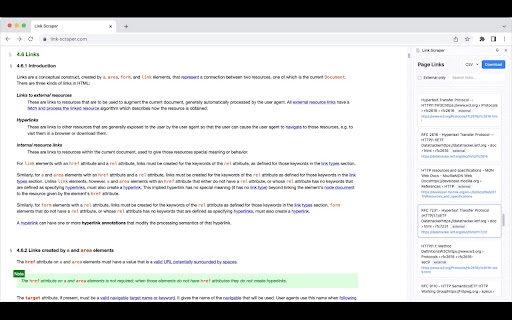
Displays all links on the current page in a side panel
? Link Scraper: The Ultimate Link Management Tool
Extract, organize, and manage all links from any webpage with this powerful and user-friendly extension. Perfect for researchers, developers, content creators, and anyone who needs to collect and organize web links efficiently.
✨ KEY FEATURES
• Link Detection
- Instantly captures all links on any webpage
- Distinguishes between internal and external links
• Filtering & Search
- Filter links by internal/external sources
- Powerful search functionality across link text and URLs
- Filters links as you type
• Export Options
- Export links to CSV for spreadsheet analysis
- Simple TXT export for quick sharing
- Includes link text, URLs, and link type
• Clean, Modern Interface
- Intuitive side panel design
- Minimal impact on browser space
- Beautiful, responsive UI
• Privacy & Security
- Works completely client-side
- No data collection
- No external server dependencies
- Respects website security policies
- No ads
? PERFECT FOR
• Digital Marketing Teams
• Content Researchers
• Web Developers
• SEO Specialists
• Students & Academics
• Content Creators
• Web Archivists
? USE CASES
• Collect research sources
• Audit website links
• Create resource lists
• Check competitor links
• Archive important references
• Monitor dynamic content
• Extract resource libraries
?️ TECHNICAL DETAILS:
• Lightweight and performance-optimized
• Built with modern web technologies
• Regular updates and improvements
• Extensive error handling
• Compatible with most websites*
* Except for browser-restricted pages (chrome://, extension://, etc.)
? Note: This extension requires permission to read webpage content to function properly. We take your privacy seriously and never collect or transmit your data.
? Make link management effortless with Link Scraper - your essential browser companion for organizing web content!
❓ Questions, suggestions, or bug reports? Email [email protected].
Made with ❤️ by Britt Binler
| 分类 | 🛠️工具 |
| 插件标识 | aikmihaplaekbahjloffcagmojapfilh |
| 平台 | Chrome |
| 评分 |
★★★★☆
4.5
|
| 评分人数 | 1634 |
| 插件主页 | https://chromewebstore.google.com/detail/link-scraper/aikmihaplaekbahjloffcagmojapfilh |
| 版本号 | 1.2.0 |
| 大小 | 33.18KiB |
| 官网下载次数 | 66 |
| 下载地址 | |
| 更新时间 | 2024-11-17 00:00:00 |
CRX扩展文件安装方法
第1步: 打开Chrome浏览器的扩展程序
第2步:
在地址栏输入: chrome://extensions/
第3步: 开启右上角的【开发者模式】
第4步: 重启Chrome浏览器 (重要操作)
第5步: 重新打开扩展程序管理界面
第6步: 将下载的crx文件直接拖入页面完成安装
注意:请确保使用最新版本的Chrome浏览器
同类插件推荐
Link Scraper
Displays all links on the current page in a side p

Link in Current Tab
Force all links to be opened in current tab instea

Create Link
Copy current page URL to clipboard in various form

Open in Sidebar
Drop any link to the sidebar for dual-pane accessT