
Pinyin Annotator Chrome 插件, crx 扩展下载
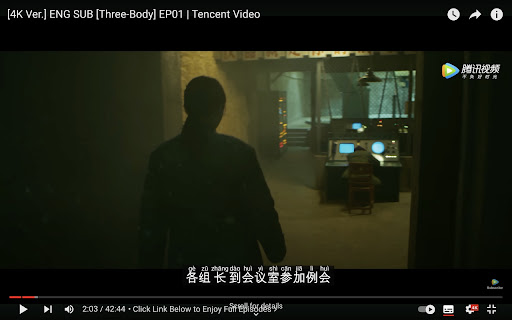
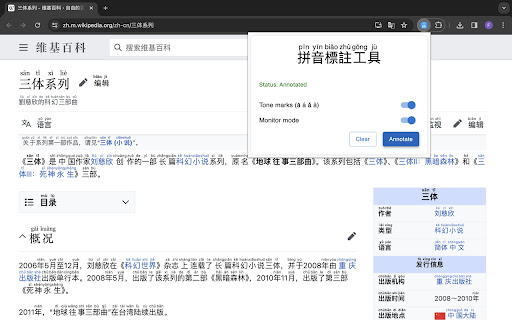
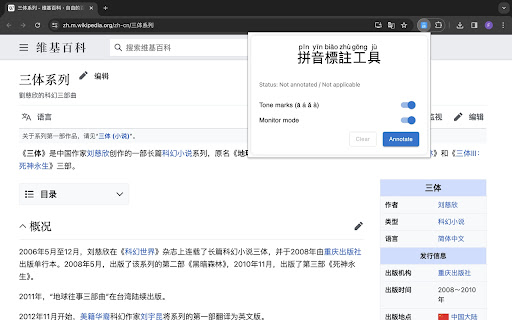
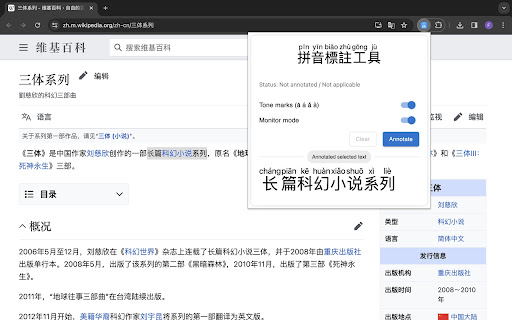
A browser extension overlays Hanyu Pinyin annotations over Chinese characters present in web pages and video closed captions.
Pinyin Annotator is a browser extension that overlays Hanyu Pinyin annotations over Chinese characters in web pages and video closed captions, enhancing your Chinese language learning journey.
## Features
- Enhanced Video Streaming: Integrate pinyin into Chinese subtitles (closed captions) on video streaming platforms such as Netflix, Disney+, YouTube, Bilibili, and more for an enriched viewing experience.
- Support for Simplified (汉) and Traditional (漢) Chinese.
- Easy Accessibility: Highlight text and click the extension icon to view the Pinyin of the selected text without disrupting the entire page. Click to look up the word in a dictionary.
- Open-Source: Unlike many browser extensions that do not disclose their code, leaving you uncertain about their operations, this extension allows you to review every line of code. Furthermore, you can build it yourself or contribute to it on GitHub.
- Keyboard shortcut: Use `Alt`(`Option` on macOS) + `Shift` + `P` to toggle annotation (customizable).
| 分类 | 🛠️工具 |
| 插件标识 | ajacnabcdcbcdoijcakhgglokndlnpak |
| 平台 | Chrome |
| 评分 |
★★★★★
5
|
| 评分人数 | 2 |
| 插件主页 | https://chromewebstore.google.com/detail/pinyin-annotator/ajacnabcdcbcdoijcakhgglokndlnpak |
| 版本号 | 1.4.1 |
| 大小 | 7.13MiB |
| 官网下载次数 | 878 |
| 下载地址 | |
| 更新时间 | 2024-11-07 00:00:00 |
CRX扩展文件安装方法
第1步: 打开Chrome浏览器的扩展程序
第2步:
在地址栏输入: chrome://extensions/
第3步: 开启右上角的【开发者模式】
第4步: 重启Chrome浏览器 (重要操作)
第5步: 重新打开扩展程序管理界面
第6步: 将下载的crx文件直接拖入页面完成安装
注意:请确保使用最新版本的Chrome浏览器
同类插件推荐
Jyutping & Pinyin Subtitles for YouTube, Netflix, Disney+, Bilibili & more
Transform Chinese subtitles on YouTube, Netflix, D

Add Pinyin
Adds Simplified Chinese pinyin to Chinese text on
Pinyin Annotator
A browser extension overlays Hanyu Pinyin annotati

PinyinTube
PinyinTube is a Chrome extension that helps users

chinese pinyin
Add pinyin to chinese text.An tool to add pinyin t

LiuChan Chinese Popup Dictionary
A modern lightweight mouse-over popup dictionary f

Hanzi to Pinyin
Converts Chinese characters to pinyin.Hanzi (Chine
Pinyinizer
Annotate Hanzi (汉字) on the page with ruby.Pinyiniz

Pinyin Reader
Adds pinyin captions above Chinese Hanzi scriptAdd

Chinese Tools
Useful Chinese learning tools, can be used to conv

Zhongzhong: An improved Chinese Dictionary
Currently the best Chinese popup dictionary. More

Zhongwen: Chinese-English Dictionary
Great tool for learning Chinese. Includes links to
Chinese words separator: Chinese dictionary
Look up the Chinese words of English words as well